
MCP server · Productivity
Kanboard MCP server
by bivex
Lets your AI read and update your Kanboard projects, tasks, and users by chatting in plain words.
This is a small helper program that connects your AI assistant to Kanboard, the project management tool. Once it is set up, you can ask your AI things like "show me all overdue tasks" or "create a task called Design homepage" and it will do that in Kanboard for you. It is handy for anyone who uses Kanboard at work and would rather type a sentence than click through menus.
What is an MCP server? The 30-second version
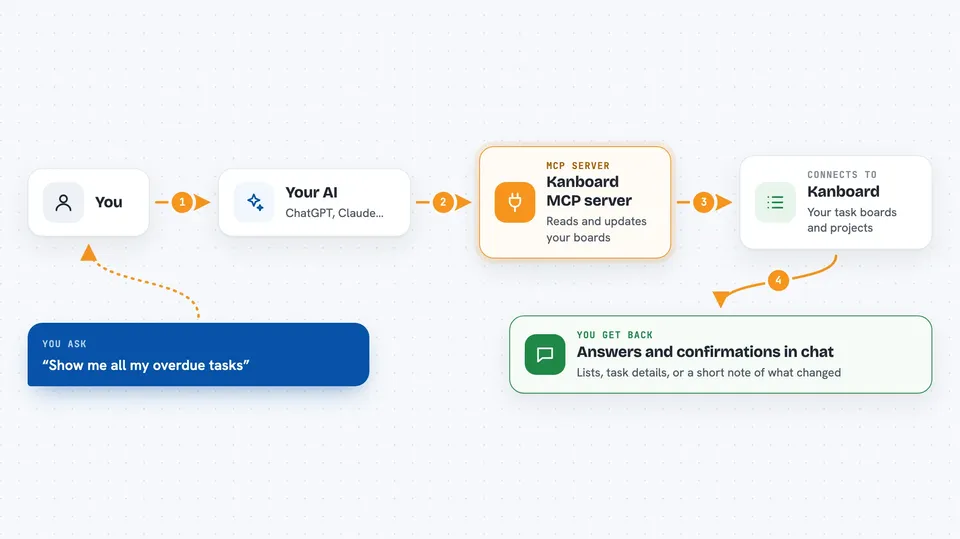
On its own, your AI can only chat. It cannot see your Kanboard boards or change anything there. An MCP server is a small helper program that gives your AI a new skill, in this case a connection to your Kanboard account. When you ask a question, your AI passes it to this helper, the helper talks to Kanboard, and the answer comes back into your chat.
What this MCP server does
You type a request in plain words, like asking for your overdue tasks or telling the AI to create a new project. Your AI sends that request to this helper program. The helper logs into your Kanboard account using the details you set up and asks Kanboard to do the thing you wanted. Kanboard responds, and the helper passes the result back to your AI. Your AI then shows you the answer or confirms the change in the chat.
 Click to zoom
What you can do with it
- List all your Kanboard projects and their details
- Create, update, or remove tasks in a project
- Assign tasks to people and set due dates
- Show all overdue tasks for you or a project
- Add and edit comments on tasks
- Create and manage columns, categories, and swimlanes
- Check your own dashboard and recent activity
Try asking your AI
- “Show me all my overdue tasks”
- “Create a task called Design homepage in the Website Redesign project”
- “Assign the API task to John and set its due date to 2024-01-15”
- “Show me all comments on task 123”
What it gives back to you
You get back plain answers in your chat: lists of projects or tasks, task details, comments, or a short confirmation that something was created, updated, or removed. For example, asking for overdue tasks gives you a list with names and dates. When you ask it to change something, it tells you what it did.
Before you start
What you need
- A Kanboard account with API access turned on
- Your Kanboard web address and an API key (a kind of password for apps, which you can find in your Kanboard settings)
- The Go programming language installed if you build it yourself, or a prebuilt program file
- An MCP-compatible app like Claude Desktop or Cursor
Good to know
It can change or delete things in your Kanboard account, so double-check before saying yes to actions like removing a project or task.
Install it with your AI
Add Kanboard MCP server to your AI, no technical skills needed
You don't install anything by hand. You copy one prompt, paste it into an AI that can work on your computer, and it checks, installs and connects the server for you, asking you when it needs something.
Sign in to get the install prompt
Members get a ready-made prompt that lets the Claude desktop app check Kanboard MCP server, install it and connect it for them, step by step. You don't need any technical skills: you copy, paste and answer a few questions. Your connected AI can also find and install any of the 4,609 MCP servers here for you.
Who it's for
Project managers, team leads, and office workers who already use Kanboard and want to manage their boards by chatting instead of clicking.





