
MCP server · Productivity
ContextPulse MCP server
by ContextPulse
Let your AI see your screen, hear your dictations, and remember what you were doing on your computer.
ContextPulse is a small program that runs quietly on your own computer and keeps a private record of what you are working on: what is on your screen, what you say out loud, what you copy, and what you type and click. It then hands that context to your AI assistant when you ask it something. It is handy for people who want their AI to know what they are looking at right now, without sending everything to the cloud.
What is an MCP server? The 30-second version
On its own, your AI can only chat with you. It cannot see your screen or know what you were doing five minutes ago. An MCP server is a small helper program that gives your AI a new skill or a connection to something, and here it connects your AI to your own computer activity through ContextPulse. Once connected, your AI can look things up in ContextPulse and answer questions about your screen, voice, and history.
What this MCP server does
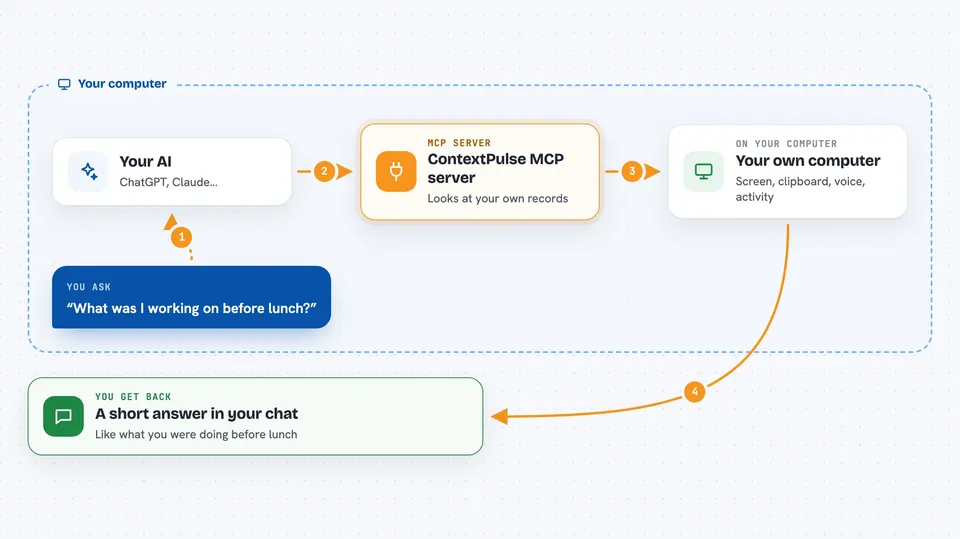
You ask your AI something like what am I looking at right now. Your AI sends that request to ContextPulse through a standard connection called MCP. ContextPulse checks its local records of your screen text, clipboard, voice dictations, and activity. It sends back a short answer, and your AI explains it to you in the chat. Everything stays on your machine unless you turn on one of the optional network features.
 Click to zoom
What you can do with it
- See what is on your screen right now as text
- Search your recent window titles and screen text for a word
- Read back your recent voice dictations
- Show which apps you used in the last few hours
- Look up what you copied to the clipboard recently
- Store and recall small notes your AI can remember later
- Tell you what you were working on before lunch
Try asking your AI
- “What am I looking at right now?”
- “What was I working on before lunch?”
- “Search my screen history for the word auth”
- “Read back my last few voice dictations”
What it gives back to you
You get plain answers in the chat, like a short summary of your screen or a list of apps you used. It can also return lists of clipboard entries, voice transcriptions, or activity summaries with times. Some tools return numbers, like how many keystrokes you typed or how long you dictated. It does not change anything on your computer unless you ask it to store a memory.
Before you start
What you need
- A Windows 10+ or macOS 13+ computer
- Python installed so you can run the setup commands
- The ContextPulse daemon running in the background
- An MCP client like Claude Code, Cursor, or Gemini CLI
Good to know
ContextPulse records your screen, voice, clipboard, and typing, so be careful about what is on your screen while it runs, and remember that your AI client decides what happens to the text after it reads it.
Install it with your AI
Add ContextPulse MCP server to your AI, no technical skills needed
You don't install anything by hand. You copy one prompt, paste it into an AI that can work on your computer, and it checks, installs and connects the server for you, asking you when it needs something.
Sign in to get the install prompt
Members get a ready-made prompt that lets the Claude desktop app check ContextPulse MCP server, install it and connect it for them, step by step. You don't need any technical skills: you copy, paste and answer a few questions. Your connected AI can also find and install any of the 4,066 MCP servers here for you.
Who it's for
People who work on a computer all day and want their AI assistant to know what they are doing without explaining it every time.





