
MCP server · Notes
Obsidian MCP server
Lets your AI read, search, and edit the notes in your Obsidian vault on your own computer.
This is a small helper that connects your AI assistant to your Obsidian notes. Obsidian is a note-taking app that keeps your notes as plain text files in a folder on your computer. If you keep notes there, this helper lets your AI look through them and, if you allow it, make changes for you.
What is an MCP server? The 30-second version
On its own, your AI can only chat with you. It cannot see the files on your computer. An MCP server is a small helper program that gives your AI one new skill. This helper gives it a connection to your Obsidian vault folder, so when you ask about your notes, the AI can actually go and read them, search them, or write to them for you.
What this MCP server does
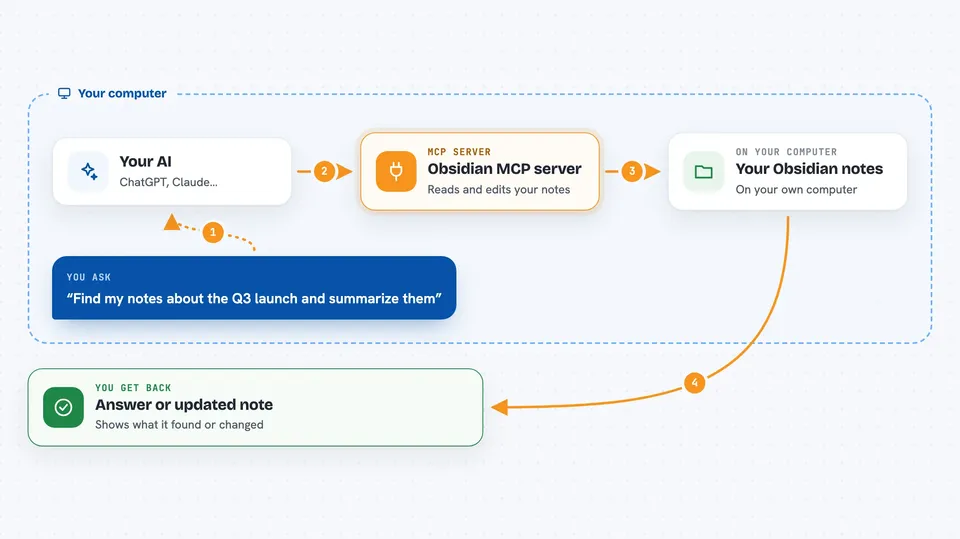
You ask your AI something about your notes, like finding a topic or adding a new note. The AI passes that request to this helper program running quietly on your computer. The helper opens the markdown files in your Obsidian folder directly, without needing the Obsidian app open. It reads, searches, or writes what you asked for, then hands the result back to the AI. The AI shows you the answer or confirms the change in the chat.
 Click to zoom
What you can do with it
- Read any note in your vault by its path
- Search your notes by title, content, or tags
- Create new notes and folders
- Update or delete existing notes
- List all your tags and find backlinks between notes
- Create and edit Obsidian Bases, which are database-style views over your notes
- Generate summaries, status reports, or release notes from your vault
Try asking your AI
- “Find all my notes about the Q3 launch and summarize them”
- “Create a new note called Meeting Notes 2025-06-01 in my Work folder with today's date”
- “What tags do I use most often in my vault?”
- “Add a checkbox task to my daily note for tomorrow”
What it gives back to you
You get answers in the chat, like a list of matching notes, a summary, or a count of tags. When it creates or changes a note, it tells you what it did and where the file is. If you turned on backups, it quietly saves a copy of the old version first. You can also ask it to write a report back into your vault as a new note.
Before you start
What you need
- Python 3.10 or newer on your computer
- An Obsidian vault saved as a folder of markdown files on your computer
- An AI app that can use MCP servers, like Claude Desktop, Claude Code, Cursor, Cline, Codex, or Grok
Good to know
It can change or delete your notes, so turn on read-only mode or backup-on-write if you want to be careful.
Install it with your AI
Add Obsidian MCP server to your AI, no technical skills needed
You don't install anything by hand. You copy one prompt, paste it into an AI that can work on your computer, and it checks, installs and connects the server for you, asking you when it needs something.
Sign in to get the install prompt
Members get a ready-made prompt that lets the Claude desktop app check Obsidian MCP server, install it and connect it for them, step by step. You don't need any technical skills: you copy, paste and answer a few questions. Your connected AI can also find and install any of the 4,361 MCP servers here for you.
Who it's for
People who keep notes in Obsidian and want their AI to help read, search, and organize them without leaving the chat.





