
MCP server · Notes
Zettelkasten MCP server
by entanglr
Let your AI build and explore a linked note collection, one idea per note, so your notes grow into a network.
This is a helper that connects your AI assistant to a Zettelkasten, a note system where each note holds one idea and notes link to each other. It is handy if you take a lot of notes for work, study, or writing and want your AI to help you create, connect, and search them. Everything is saved as plain text files on your own computer.
What is an MCP server? The 30-second version
On its own, your AI can only chat with you. An MCP server is a small helper program that gives your AI a new skill or a connection to an app or service. This one connects your AI to your Zettelkasten notes, so it can look things up and make changes there when you ask. You stay in the chat, and the helper does the work behind the scenes.
What this MCP server does
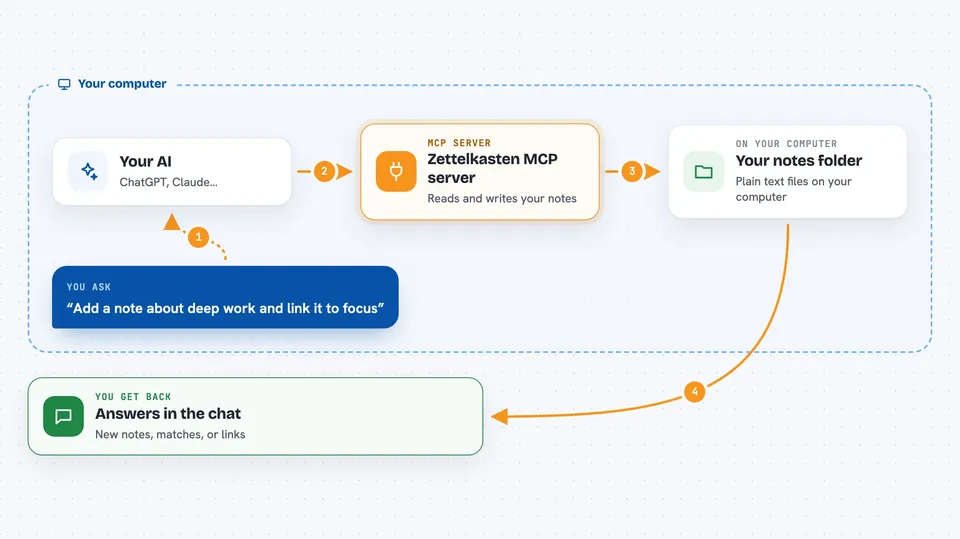
You ask your AI something about your notes, like adding a new idea or finding related ones. The AI uses this helper to read or write in your note folder. The helper keeps your notes as simple text files and also keeps a fast index so searching and linking stay quick. Then you get the result back in the chat, like a new note, a list of matches, or a set of links. If you edit the text files yourself outside the chat, you ask the helper to refresh its index.
 Click to zoom
What you can do with it
- Create a new note with a title, content, and tags
- Link two notes together with a relationship like supports or contradicts
- Search your notes by words, tags, or links
- See which notes link to a specific note
- Find notes with the most connections or notes with none
- List notes by the date they were created or updated
- Remove a link or delete a note
Try asking your AI
- “Add a permanent note titled Deep work needs quiet mornings, tag it productivity, and link it to my note about focus”
- “Find all my notes tagged reading and show me which ones link to each other”
- “Which notes have no links yet? Suggest a few that could connect to my hub note on learning”
- “Search my notes for anything about habit formation and summarize what I have”
What it gives back to you
You get answers and lists right in the chat, like matching notes with their titles and short previews, a note's full text, or the links around a note. When it creates, updates, links, or deletes something, it tells you what it changed. Searches come back as a ranked list of notes so you can pick the one you want. It does not show you a separate app, everything happens in the conversation.
Before you start
What you need
- Python installed on your computer
- The uv tool for Python projects
- The Claude desktop app or another AI app that supports MCP servers
- A folder on your computer where your notes will live
Good to know
This helper can change and delete your notes, and the project warns it is experimental, so keep backups of your note folder.
Install it with your AI
Add Zettelkasten MCP server to your AI, no technical skills needed
You don't install anything by hand. You copy one prompt, paste it into an AI that can work on your computer, and it checks, installs and connects the server for you, asking you when it needs something.
Sign in to get the install prompt
Members get a ready-made prompt that lets the Claude desktop app check Zettelkasten MCP server, install it and connect it for them, step by step. You don't need any technical skills: you copy, paste and answer a few questions. Your connected AI can also find and install any of the 4,361 MCP servers here for you.
Who it's for
Writers, students, researchers, and anyone who keeps a lot of notes and wants an AI to help organize and connect them.





