
MCP server · API
Liquid MCP server
by ertad-family
Lets your AI reach almost any web API, database or device and pull back clean, typed data.
Liquid is a helper program that connects your AI to other systems, like web APIs, databases, email, or even smart home devices. You point it at a web address or a database, and it works out how to talk to it for you. It is handy if you keep asking your AI to look things up in different tools and want that to just work.
What is an MCP server? The 30-second version
On its own, your AI can only chat with you using what it already knows. An MCP server is a small helper program that gives your AI a new skill or a connection to an outside service. Liquid is that helper here: it connects your AI to web APIs, databases and devices, so the AI can look things up or make changes there when you ask. You install it once on your own computer, and your AI can then use it in the background.
What this MCP server does
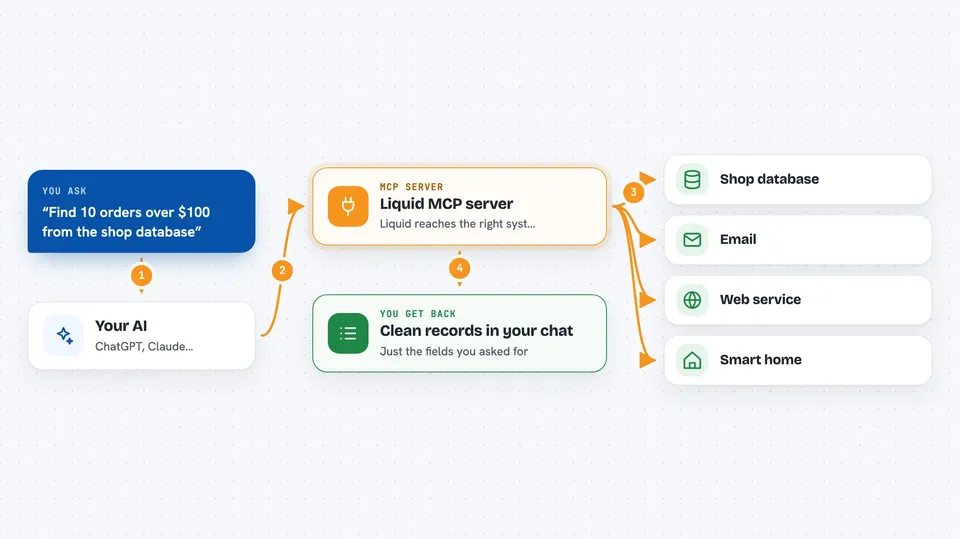
You ask your AI a question, like finding recent orders over a certain amount. The AI passes that request to Liquid, which figures out how to talk to the right system, such as a web API or a database. Liquid handles the messy parts, like logging in, paging through long lists, and tidying up the results into a consistent shape. Then it hands the AI clean records, and the AI shows you the answer in the chat. It can also read live streams and, if you allow it, write changes back.
 Click to zoom
What you can do with it
- Pull records from a web API your AI has never seen before
- Search and filter data on the server side instead of downloading everything
- Read from databases like Postgres, MySQL, SQLite, MongoDB or Redis
- Read and send email through IMAP, SMTP or the Gmail API
- Watch live event streams, like new mail or smart home changes
- Estimate how big or costly a request will be before running it
- Write changes to a database when you turn writes on
Try asking your AI
- “Find 10 orders over $100 from the shop database”
- “Show me revenue grouped by status for last month”
- “Look up the shipping ticket about a delayed delivery”
- “Check the current state of my smart home lights”
What it gives back to you
You get back tidy, typed records, like a short list of orders with just the fields you asked for. For bigger questions, it can return summaries or numbers, such as a total or a count per group. If something goes wrong, it explains the problem and suggests the next step instead of dumping confusing error text. When writes are allowed, it also tells you what it changed.
Before you start
What you need
- Python installed on your computer
- The Liquid package installed with pip (pip install liquid-api)
- A key for an AI model, like OpenAI, Gemini or Anthropic, or a local model address
- A web address or database connection string for the system you want to reach
Good to know
It is read-only by default, but if you turn on writes it can change or delete data in your databases, so be careful with what you ask it to do.
Install it with your AI
Add Liquid MCP server to your AI, no technical skills needed
You don't install anything by hand. You copy one prompt, paste it into an AI that can work on your computer, and it checks, installs and connects the server for you, asking you when it needs something.
Sign in to get the install prompt
Members get a ready-made prompt that lets the Claude desktop app check Liquid MCP server, install it and connect it for them, step by step. You don't need any technical skills: you copy, paste and answer a few questions. Your connected AI can also find and install any of the 4,609 MCP servers here for you.
Who it's for
People who want their AI to pull data from web APIs, databases or devices without building custom connectors, especially analysts, support staff and small teams.


