
MCP server · Speech to text
YouTube Transcriber MCP server
by format37
Turn YouTube videos into text your AI can read, search, and summarize for you.
This is a small helper program that lets your AI turn a YouTube video into written text. You give it a video link, and it hands back a transcript you can read or ask questions about. It is handy if you watch talks, tutorials, or interviews and would rather skim the words than sit through the whole thing.
What is an MCP server? The 30-second version
On its own, your AI can only chat with you using what it already knows. An MCP server is a small helper program that gives your AI one new skill. This helper gives your AI a connection to YouTube, so it can grab a video's audio and write it out as text. When you ask for a transcript, your AI passes the request to this helper, and the helper does the work behind the scenes.
What this MCP server does
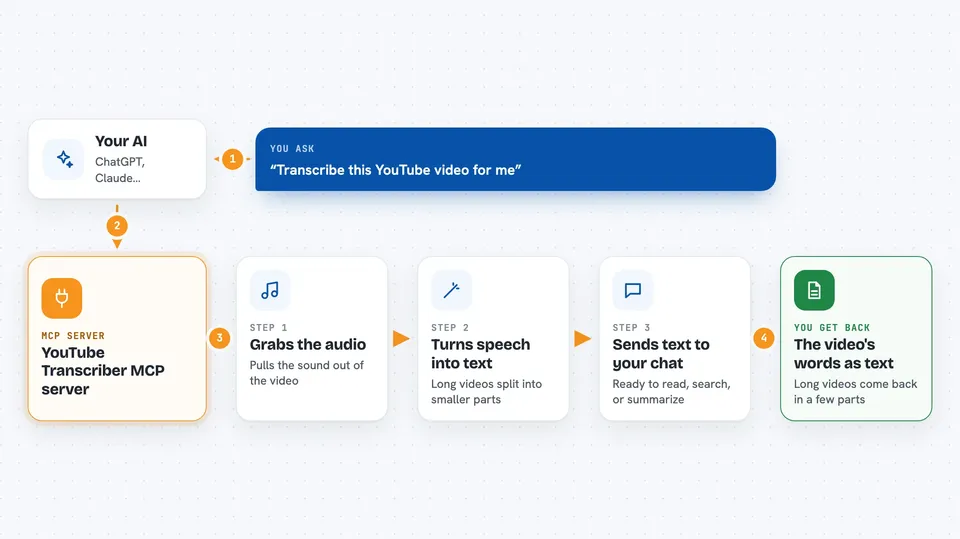
You paste a YouTube link and ask your AI to transcribe it. Your AI sends that link to this helper program. The helper downloads the video's audio, then sends that audio to OpenAI's Whisper service, which turns speech into text. For very long videos, it breaks the audio into smaller chunks so nothing gets cut off. The finished transcript comes back to you in the chat.
 Click to zoom
What you can do with it
- Transcribe a YouTube video into readable text
- Get a transcript for a long video in chunks
- Ask your AI to summarize a video from its transcript
- Search inside a transcript for a topic or quote
- Turn a talk or interview into notes you can keep
Try asking your AI
- “Transcribe this YouTube video for me: https://www.youtube.com/watch?v=abc123”
- “Give me the transcript of this talk and then a short summary”
- “Find the part of this video where they talk about pricing”
- “Transcribe this hour-long lecture and split the text into sections”
What it gives back to you
You get the spoken words of the video as text, right in the chat. For long videos, the text comes back in several parts instead of one giant block. From there you can ask your AI to summarize it, pull out quotes, or answer questions about what was said. Nothing on YouTube changes; you just get a copy of the words.
Before you start
What you need
- An OpenAI API key (a kind of password for apps; OpenAI gives you one when you sign up, and it is paid per use)
- A cookies.txt file exported from your browser (the README explains how)
- A computer or server that can run Docker, since this runs in a container
- The Claude desktop app if you want to connect it there
Good to know
Transcribing sends the video's audio to OpenAI, which costs money on your OpenAI account, and the server needs your browser cookies to work.
Install it with your AI
Add YouTube Transcriber MCP server to your AI, no technical skills needed
You don't install anything by hand. You copy one prompt, paste it into an AI that can work on your computer, and it checks, installs and connects the server for you, asking you when it needs something.
Sign in to get the install prompt
Members get a ready-made prompt that lets the Claude desktop app check YouTube Transcriber MCP server, install it and connect it for them, step by step. You don't need any technical skills: you copy, paste and answer a few questions. Your connected AI can also find and install any of the 4,361 MCP servers here for you.
Who it's for
People who watch a lot of videos for work, like researchers, students, journalists, and anyone who wants searchable notes from talks and interviews.


