
MCP server · Productivity
Doc Manager MCP server
Let your AI list, read, search and create your plaintext documents in a private Azure vault.
Doc Manager is a personal document vault that lives in the cloud on Azure storage. It comes with an MCP server, which means you can talk to your documents from a Claude chat instead of clicking around a website. It is handy if you keep notes, drafts or reference files online and want your AI to read them or add to them for you.
What is an MCP server? The 30-second version
On its own, your AI can only chat with you. An MCP server is a small helper program that gives your AI one extra skill or one extra connection, here to your Doc Manager vault. Once it is connected, your AI can look things up in your documents or make changes there when you ask. You stay in the chat, and the helper does the fetching and saving behind the scenes.
What this MCP server does
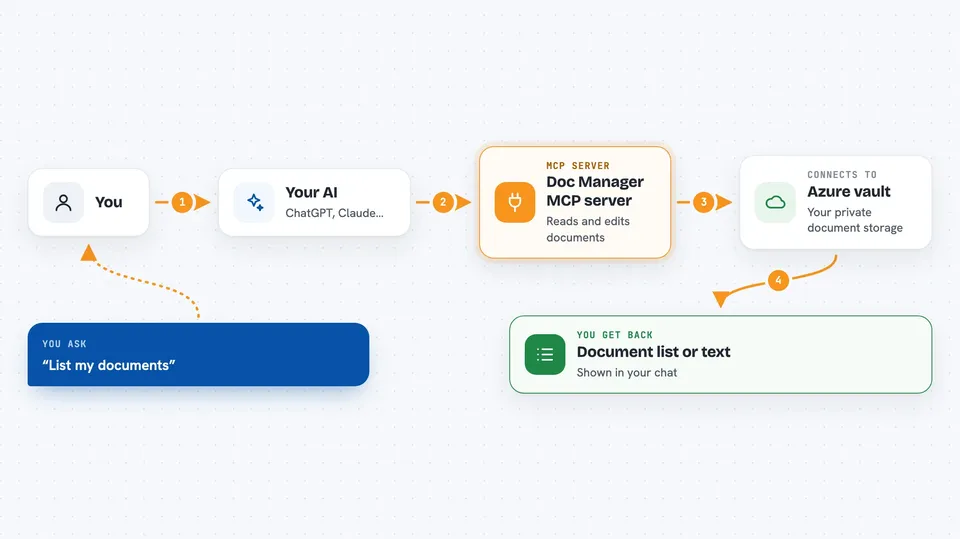
You ask your AI something about your documents, like listing them or finding one by name. The AI passes that request to the Doc Manager helper. The helper talks to your vault on Azure storage, where your files actually live. It brings back the answer, a list, or the text of a document, and shows it to you in the chat. If you ask it to create or update a plaintext document, it does that too and tells you the new document's id.
 Click to zoom
What you can do with it
- List all your documents with their titles, sizes and whether they are encrypted
- Read the full text of any plaintext document by its id
- Search your documents by title and by words inside the plaintext content
- Create a new plaintext document from the chat and get its id back
- Update the content or title of an existing plaintext document
- Attach a file to a document, either as text or as a base64-encoded binary
- Delete a document and all its files, or delete just its attachment
What it gives back to you
You get answers in the chat: a list of documents with their ids and titles, the full text of a document you asked for, or a short confirmation when something was created, updated or deleted. Search results come back as matching documents, not as a separate file. For attachments, it can give you the filename and the file content, either as readable text or as base64 data.
Before you start
What you need
- A Doc Manager server running somewhere, with its public web address
- A GitHub account, because the login goes through GitHub
- Your GitHub username added to the server's allowed users list
- A GitHub OAuth App's Client ID and Client Secret, which the server owner sets up
Good to know
The delete tools remove documents and files for good, and encrypted documents can be listed but never read or changed by the AI.
Install it with your AI
Add Doc Manager MCP server to your AI, no technical skills needed
You don't install anything by hand. You copy one prompt, paste it into an AI that can work on your computer, and it checks, installs and connects the server for you, asking you when it needs something.
Sign in to get the install prompt
Members get a ready-made prompt that lets the Claude desktop app check Doc Manager MCP server, install it and connect it for them, step by step. You don't need any technical skills: you copy, paste and answer a few questions. Your connected AI can also find and install any of the 4,609 MCP servers here for you.
Who it's for
People who keep personal notes or reference documents in the cloud and want their AI assistant to read and update them without leaving the chat.



