
MCP server · Email
Notmuch MCP server
by hgn
Lets your AI search and read your local email through notmuch, and find what still needs a reply.
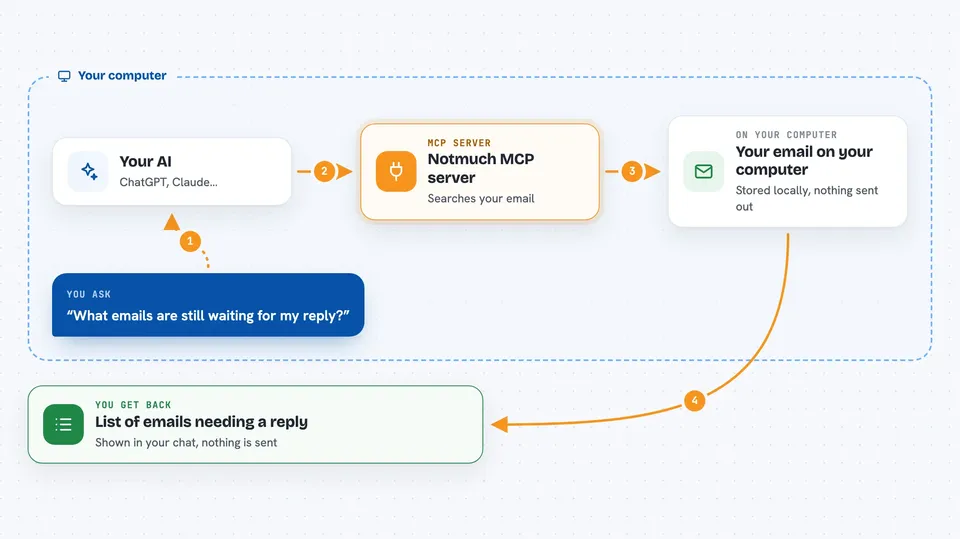
This is a small helper that connects your AI assistant to your own email on your computer, using a tool called notmuch. It is handy if you keep your mail in a local folder and want to ask questions about it in plain words. Think of it as letting your AI look through your inbox for you, without sending anything.
What is an MCP server? The 30-second version
On its own, your AI can only chat with you. An MCP server is a small helper program that gives your AI a new skill or a connection to an app or service. This one connects your AI to your local notmuch email database, so it can search, read, and summarize your mail when you ask. You install it once, and then your AI can use it during your conversations.
What this MCP server does
You ask your AI something about your email, like what is still unanswered. Your AI passes that request to this helper program. The helper then runs real notmuch searches on your computer and reads the matching messages. It hands the results back to your AI, which explains them to you in the chat. Nothing is sent, and nothing is changed unless you turn on extra options.
 Click to zoom
What you can do with it
- Search your mail by sender, subject, date, or tag
- Read a whole email thread from oldest to newest
- See a quick one-line overview of a long thread before reading it all
- Find out which messages still need a reply from you
- Check whether a topic has come up before
- List and read attachments, including PDFs and office documents
- Draft a plain-text reply for you to review and send yourself
Try asking your AI
- “What emails are still waiting for my reply?”
- “Show me the whole thread about the budget from last month.”
- “Has this project come up in my mail before?”
- “Find all PDF attachments from 2025.”
What it gives back to you
You get back lists of matching emails, short summaries, or full message text right in the chat. It can also tell you counts, like how many messages match a search. If you turned on drafts, it writes a draft file for you to review. It never sends anything on its own.
Before you start
What you need
- The notmuch command-line tool installed on your computer
- Your email already set up in a notmuch database
- The Claude desktop app or Claude Code
- Python and uv (the tool that runs this server)
Good to know
It can read your private email, and if you turn on the extra options it can add tags or write draft files, so only enable those if you are comfortable with that.
Install it with your AI
Add Notmuch MCP server to your AI, no technical skills needed
You don't install anything by hand. You copy one prompt, paste it into an AI that can work on your computer, and it checks, installs and connects the server for you, asking you when it needs something.
Sign in to get the install prompt
Members get a ready-made prompt that lets the Claude desktop app check Notmuch MCP server, install it and connect it for them, step by step. You don't need any technical skills: you copy, paste and answer a few questions. Your connected AI can also find and install any of the 4,609 MCP servers here for you.
Who it's for
People who keep their email locally and want an AI to help them search, read, and keep track of replies.





