
MCP server · Productivity
Orchestro MCP server
by khaoss85
Turn product ideas into tracked tasks on a Kanban board your AI can manage for you.
Orchestro is a task management helper for teams that build software with AI. It gives your AI assistant its own project board, so it can break a big idea into smaller tasks, keep track of what depends on what, and show progress on a Kanban board. It is handy for product managers, developers, and small teams who want one clear place to see what is being built.
What is an MCP server? The 30-second version
On its own, your AI can only chat with you. An MCP server is a small helper program that gives your AI a new skill or a connection to another app. This one connects your AI to Orchestro, a task and project board. Once connected, your AI can create tasks, organize them, and update the board for you when you ask.
What this MCP server does
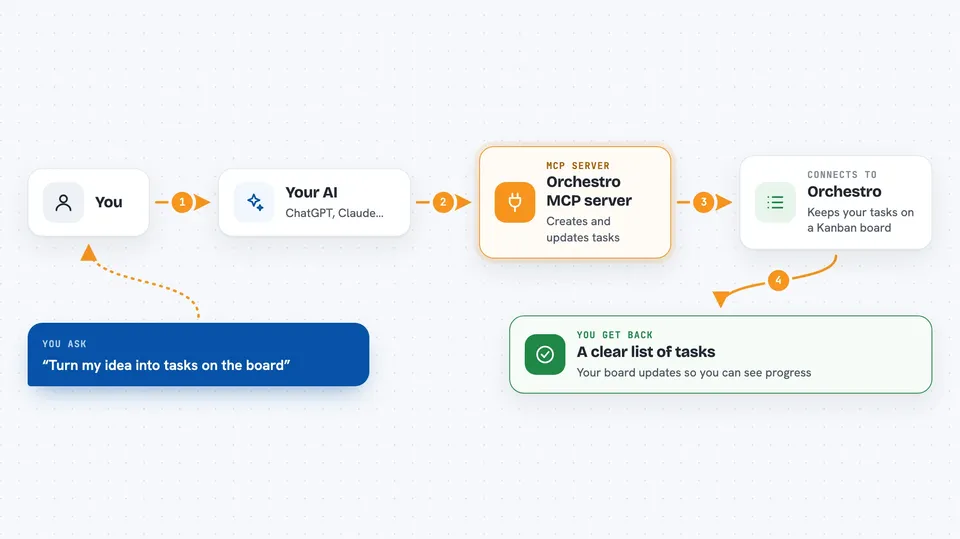
You tell your AI what you want, like a user story or a feature idea. The AI uses this helper to talk to Orchestro, which stores everything in a database and shows it on a Kanban board. Orchestro can split your idea into smaller technical tasks, note which tasks depend on others, and flag possible risks. As work moves forward, the board updates so you can see progress. Your AI can also save notes and patterns so it remembers what worked before.
 Click to zoom
What you can do with it
- Create and update tasks on a Kanban board
- Break a user story into smaller technical tasks
- List tasks filtered by status, category, or tags
- Show what depends on what between tasks
- Flag tasks that touch the same files
- Save feedback and learnings from past work
- Export a Markdown report of progress
Try asking your AI
- “Create a task called Add login page, priority high”
- “Decompose this user story into technical tasks: user should export a report as PDF”
- “Show me all tasks that are in progress”
- “What tasks depend on the database schema task?”
What it gives back to you
You get back clear answers in the chat, like a list of tasks, a summary of a story broken into steps, or a dependency map in plain words. When it creates or changes something, it tells you what it did. The Kanban board and dashboard also update so you can see the same information visually.
Before you start
What you need
- A Supabase account (free tier works)
- Your Supabase connection string and keys
- Node.js 18 or newer
- Claude Code or another AI app that supports MCP servers
Good to know
It can create, change, and delete tasks and project data, so double-check before asking it to remove anything.
Install it with your AI
Add Orchestro MCP server to your AI, no technical skills needed
You don't install anything by hand. You copy one prompt, paste it into an AI that can work on your computer, and it checks, installs and connects the server for you, asking you when it needs something.
Sign in to get the install prompt
Members get a ready-made prompt that lets the Claude desktop app check Orchestro MCP server, install it and connect it for them, step by step. You don't need any technical skills: you copy, paste and answer a few questions. Your connected AI can also find and install any of the 4,609 MCP servers here for you.
Who it's for
Product managers, developers, and small product teams who build software with AI and want one shared place to track tasks and progress.





