
MCP server · Email
mailmcp email server
by kojott
Lets your AI read, search, draft and send email across several mailboxes you own.
mailmcp is a helper you run yourself that connects your email accounts to ChatGPT or Claude. You can ask about messages across Gmail, iCloud, Fastmail, Outlook or your company mail server, and get answers in one place. It is handy if you juggle more than one mailbox or need to deal with attachments.
What is an MCP server? The 30-second version
On its own, your AI can only chat with you. An MCP server is a small helper program that gives your AI a new skill or a connection to an app or service. This one connects your AI to your email accounts, so it can look things up or do things there when you ask. You keep the passwords; the helper holds them encrypted and only unlocks them while answering your request.
What this MCP server does
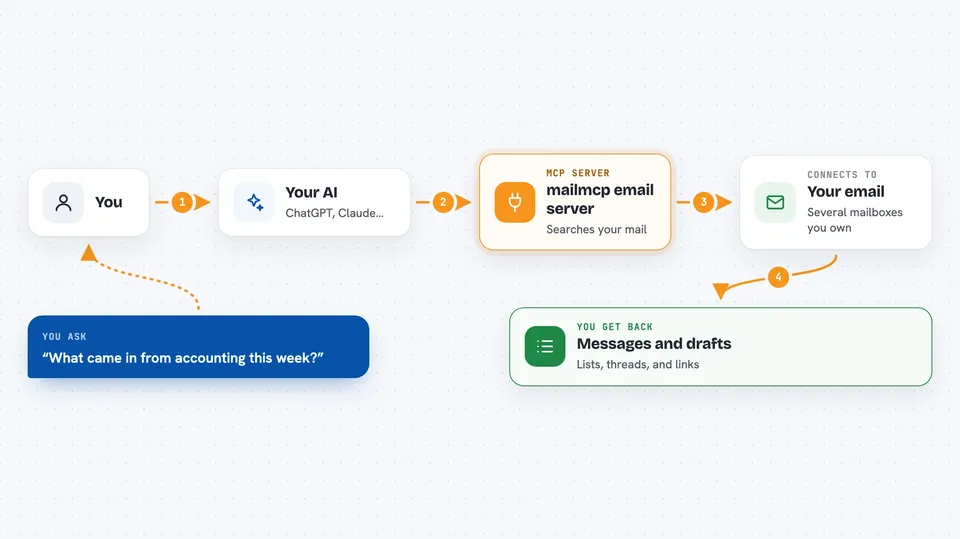
You ask your AI something about your mail, like what arrived this week. The AI passes that request to this helper. The helper signs in to your mailboxes over the normal mail protocols and searches or reads the messages. It sends the results back to your AI, which shows them to you in the chat. If you allowed it, the helper can also save a draft or send a reply for you.
 Click to zoom
What you can do with it
- Search across several mailboxes at once
- Read a message or a whole conversation thread
- Download an attachment through a one-hour link
- Save a reply as a draft for you to check
- Send or forward a message to addresses you allowlisted
- Move or flag messages in your folders
- Move a message to trash without deleting it forever
Try asking your AI
- “What came in from accounting this week?”
- “Show me the thread with the invoice from iCloud.”
- “Draft a short reply to that message and save it.”
- “Send the draft to the client, they are on my allowlist.”
What it gives back to you
You get answers in the chat: lists of messages with sender, subject and date, the text of a message or thread, and download links for attachments. When it saves a draft or sends a message, it tells you what it did. Numbers, dates and folder names come back as plain text you can read.
Before you start
What you need
- A computer or hosting account to run the helper, or the Claude Desktop app
- An HTTPS web address for the helper, if you use ChatGPT or Claude in the browser
- An app password for each mailbox (Gmail needs 2-Step Verification turned on first)
- A one-time licence key, or use the free tier
Good to know
If you allow sending, the helper can send mail from your account, so keep the recipient allowlist tight and check drafts before sending.
Install it with your AI
Add mailmcp email server to your AI, no technical skills needed
You don't install anything by hand. You copy one prompt, paste it into an AI that can work on your computer, and it checks, installs and connects the server for you, asking you when it needs something.
Sign in to get the install prompt
Members get a ready-made prompt that lets the Claude desktop app check mailmcp email server, install it and connect it for them, step by step. You don't need any technical skills: you copy, paste and answer a few questions. Your connected AI can also find and install any of the 4,609 MCP servers here for you.
Who it's for
People who manage several mailboxes, freelancers, small teams and anyone whose email provider has no official AI connector.





