
MCP server · Notes
Magnemo MCP server
by Magnemo-AI
Give your AI a long-term memory stored in plain files, where nothing gets saved until you approve it.
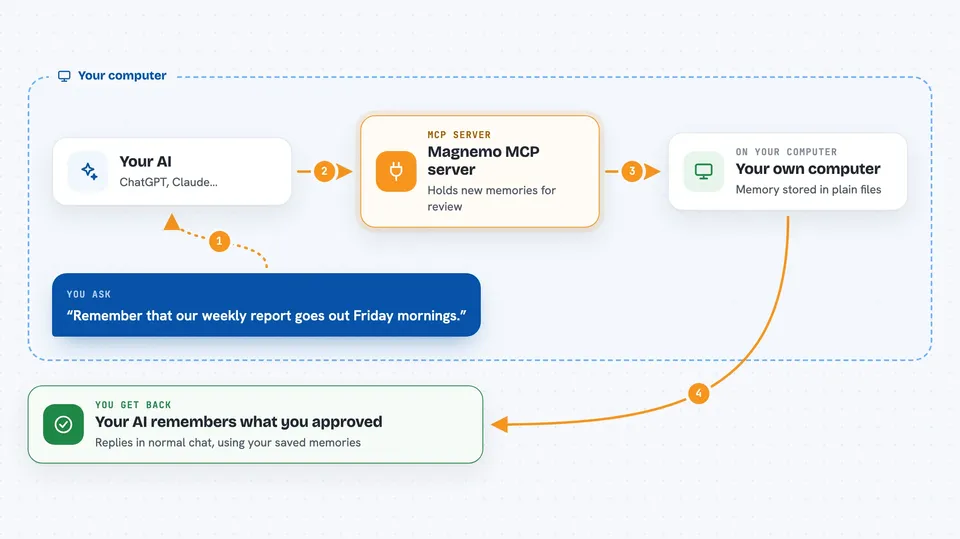
Magnemo is a memory keeper for your AI assistant. Instead of forgetting everything between chats, your AI can save useful facts and bring them back later, all inside a folder of simple text files on your own computer. It is handy if you work on projects across many sessions and are tired of repeating yourself.
What is an MCP server? The 30-second version
On its own, your AI can only talk within one conversation. An MCP server is a little helper program running next to your AI that adds a new ability. This particular helper connects your AI to a memory vault sitting in a folder on your machine. So instead of just chatting, your AI can quietly store drafts of memories and pull approved ones back whenever they matter.
What this MCP server does
When you share something worth remembering, your AI sends it to Magnemo, which puts it in a waiting area called staging rather than saving it right away. Later you look at those staged entries and decide whether to keep each one. Once you accept an item, it becomes part of your official memory, along with a note saying who added it and when. From then on, when your AI starts fresh, Magnemo feeds the approved items straight back to it. Anything rejected stays visible too, because knowing why something was turned down matters.
 Click to zoom
What you can do with it
- Ask your AI to recall past decisions and details from earlier sessions
- Let your AI suggest new memories while keeping control over what actually sticks
- Review pending suggestions in one place and accept or turn them down yourself
- Keep separate areas of memory apart so different teams' information doesn't mix
- See clearly who contributed each piece of remembered info and when
Try asking your AI
- “What did we agree last week about how users log in?”
- “Remember that our weekly report goes out Friday mornings.”
- “Summarize what you currently know about this project.”
- “Show me everything still waiting for my approval.”
What it gives back to you
Your AI replies in normal chat wording based on whatever Magnemo handed back. When you retrieve, you may see quoted snippets plus labels telling whose memory each came from. When you check the waiting pile, you typically get titles and short descriptions so picking winners takes seconds. Accepted additions simply become available going forward, often confirmed with a brief acknowledgment naming the newly saved topic.
Before you start
Good to know
Nothing reaches permanent storage except via your manual okaying action; declining choices linger visibly alongside approvals forevermore.
Install it with your AI
Add Magnemo MCP server to your AI, no technical skills needed
You don't install anything by hand. You copy one prompt, paste it into an AI that can work on your computer, and it checks, installs and connects the server for you, asking you when it needs something.
Sign in to get the install prompt
Members get a ready-made prompt that lets the Claude desktop app check Magnemo MCP server, install it and connect it for them, step by step. You don't need any technical skills: you copy, paste and answer a few questions. Your connected AI can also find and install any of the 4,066 MCP servers here for you.
Who it's for
Anyone juggling several ongoing tasks who wants an AI teammate that remembers context reliably without handing data to some far-off company.




