
MCP server · Notes
Obsidian Vault Memory MCP server
by oomkapwn
Lets your AI search your own Obsidian notes and PDFs, with sources, page numbers, and note ages.
This is a helper that connects your AI to your Obsidian vault, the folder of notes you keep on your computer. Once connected, your AI can look things up in your notes before answering, instead of guessing or forgetting. It is handy for anyone who keeps notes, journals, meeting records, or research in Obsidian and wants their AI to actually use them.
What is an MCP server? The 30-second version
On its own, your AI can only chat with what you paste in or what it already learned. An MCP server is a small helper program that gives your AI a new skill or a connection to something outside the chat. This one connects your AI to your Obsidian vault, so it can search your notes and documents when you ask. You install it once, and then your AI can reach your notes whenever a question needs them.
What this MCP server does
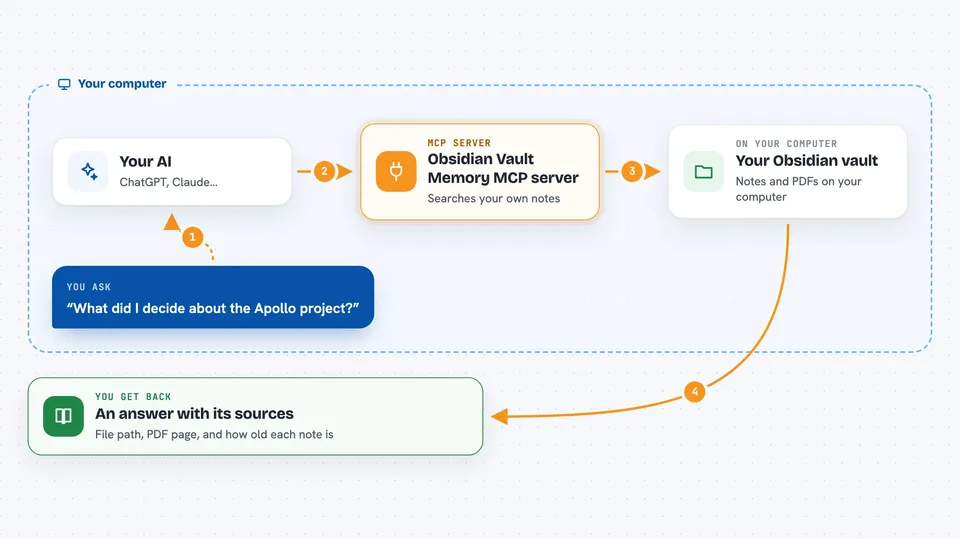
You ask your AI a question, like what you decided in a meeting last month. The AI sends that question to this helper program running on your computer. The helper searches your Obsidian vault, including Markdown notes and PDFs, and finds the most relevant passages. It sends those passages back with the file path, and for PDFs the page number, plus how old each note is. Your AI then answers using that material and can show you where each fact came from.
 Click to zoom
What you can do with it
- Search your whole Obsidian vault by meaning, not just exact words
- Find answers inside PDFs and scanned documents with page numbers
- See how old each note is so your AI can flag possibly outdated facts
- Read and summarize your daily notes, meeting notes, or research files
- Look up what you wrote about a project, person, or decision
- Run simple list and table queries over your notes
- Keep your notes as the source of truth instead of a separate memory store
Try asking your AI
- “What did I decide about the Apollo project, and where did I write it down?”
- “Search my vault for anything I noted about pricing last quarter.”
- “Summarize my daily notes from the past week.”
- “Find the PDF where I saved the vendor comparison and tell me what page the cost table is on.”
What it gives back to you
You get answers in the chat that are built from your own notes, with the source file path shown for each fact. For PDFs, you also get the page number. Search results can include how many days old each note is and whether it looks stale. If nothing relevant is found, the AI can tell you that instead of making something up.
Before you start
What you need
- An Obsidian vault folder on your computer
- Node.js installed (the free program that runs this helper)
- An MCP-compatible AI app, such as Claude Desktop, Claude Code, or Cursor
Good to know
It reads your private notes and documents, so only connect it to a vault you are comfortable letting your AI app see, and remember that anything it retrieves is then handled by that app.
Install it with your AI
Add Obsidian Vault Memory MCP server to your AI, no technical skills needed
You don't install anything by hand. You copy one prompt, paste it into an AI that can work on your computer, and it checks, installs and connects the server for you, asking you when it needs something.
Sign in to get the install prompt
Members get a ready-made prompt that lets the Claude desktop app check Obsidian Vault Memory MCP server, install it and connect it for them, step by step. You don't need any technical skills: you copy, paste and answer a few questions. Your connected AI can also find and install any of the 4,361 MCP servers here for you.
Who it's for
People who keep notes, journals, or research in Obsidian and want their AI assistant to remember and cite them.





