
MCP server · Health and learning
NotebookLM MCP server
by roomi-fields
Ask your own documents questions and get answers with citations, plus podcasts, videos, and study aids.
This is a helper that connects your AI assistant to Google NotebookLM, the tool where you upload documents and ask questions about them. Once it is set up, you can ask your AI to add sources, ask questions, and generate things like podcasts or quizzes from your notebooks. It is handy if you work with a lot of documents and want answers that point back to the exact page they came from.
What is an MCP server? The 30-second version
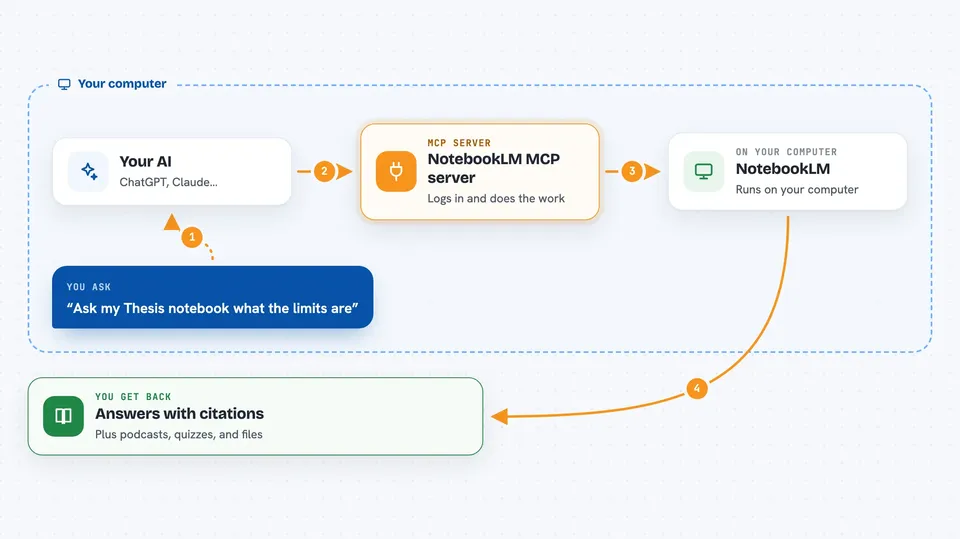
On its own, your AI can only chat with you using what it already knows. An MCP server is a small helper program that gives your AI a new skill, in this case a connection to your Google NotebookLM account. When you ask a question, your AI passes it to this helper, the helper talks to NotebookLM, and the answer comes back into your chat. So your AI can now read your uploaded documents and pull answers out of them for you.
What this MCP server does
You tell your AI what you want, like adding a PDF to a notebook or asking a question about your sources. The AI sends that request to this helper, which logs into NotebookLM on your behalf and does the work there. NotebookLM reads your documents and writes an answer that cites which source it came from. The helper brings that answer, with the citations, back into your chat. You can also ask it to create things like an audio overview, a quiz, or a mind map from your notebook.
 Click to zoom
What you can do with it
- Add PDFs, web links, YouTube videos, or plain text as sources to a notebook
- Ask questions and get answers with citations pointing to your sources
- Generate an audio podcast, video, report, or slide deck from a notebook
- Create flashcards, quizzes, and mind maps for studying
- List and search across all your notebooks
- Read the full text of a source the way NotebookLM sees it
- Download generated audio, video, and images to your computer
Try asking your AI
- “Add this PDF to my Research notebook and summarize the main findings”
- “Ask my Thesis notebook what the limitations section says, with citations”
- “Generate a podcast overview of my Marketing notebook in Spanish”
- “Make a quiz from my Biology notebook and save it”
What it gives back to you
You get answers written in plain language, each one showing which source it came from and often the exact quoted lines. For generated content, you get files you can download, like an audio file, a video, or an image, or the text of a report right in the chat. Lists of your notebooks and sources come back as simple tables you can read. If it made a change, like adding a source or deleting a draft, it tells you what it did.
Before you start
What you need
- A Google account (a dedicated one is recommended for automation)
- Node.js 18 or newer installed on your computer
- A one-time Google login run in a terminal, which opens a Chrome window
Good to know
It logs into your Google account and can add, change, or delete notebooks and sources, so use a dedicated account and check what it is about to do before confirming.
Install it with your AI
Add NotebookLM MCP server to your AI, no technical skills needed
You don't install anything by hand. You copy one prompt, paste it into an AI that can work on your computer, and it checks, installs and connects the server for you, asking you when it needs something.
Sign in to get the install prompt
Members get a ready-made prompt that lets the Claude desktop app check NotebookLM MCP server, install it and connect it for them, step by step. You don't need any technical skills: you copy, paste and answer a few questions. Your connected AI can also find and install any of the 4,361 MCP servers here for you.
Who it's for
Researchers, students, and anyone who works with many documents and wants cited answers or study materials without clicking through the NotebookLM website.




