
MCP server · Notes
AgentRAM MCP server
by seanmarkwei
Give your AI a memory that lasts between chats, so it can save and look up facts for you.
AgentRAM is a memory service for AI assistants. This MCP server connects your AI to it, so the AI can remember things from one conversation to the next instead of starting fresh every time. It is handy if you use ChatGPT or Claude for ongoing work and keep repeating yourself.
What is an MCP server? The 30-second version
On its own, your AI can only chat with you in the moment. An MCP server is a small helper program that gives your AI a new skill or a connection to another service. This one connects your AI to AgentRAM, a place where it can save notes and read them back later. Once it is set up, you just ask your AI to remember or recall something, and it uses this helper behind the scenes.
What this MCP server does
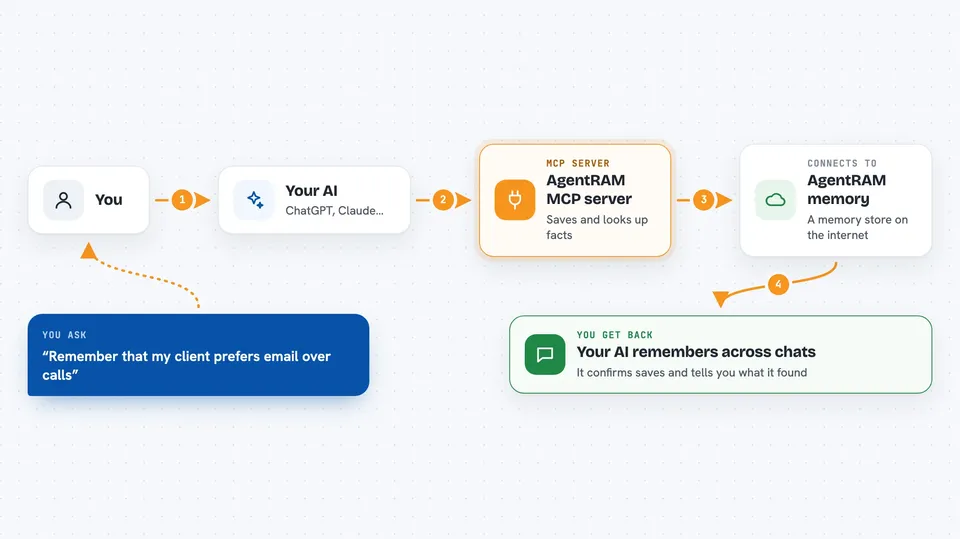
You ask your AI to remember something, like a preference or a project detail. The AI sends that to the AgentRAM helper, which stores it under a name you or the AI choose. Later, when you ask about it, the AI asks the helper to look it up and tells you what it found. You can also ask it to search across everything it has saved, or to keep a history of facts that change over time. The helper talks to AgentRAM over the internet, so your AI does not need any special setup on your computer.
 Click to zoom
What you can do with it
- Save a note or fact under a name so your AI can find it later
- Look up something your AI saved in a previous chat
- Search across all saved notes by keyword
- List everything your AI has stored
- Delete a note you no longer need
- Share a memory pool between several AI assistants
- Track facts that change over time, like a project status
Try asking your AI
- “Remember that my client prefers email over phone calls”
- “What did I tell you about the Q3 budget last week?”
- “Search your memory for anything about the Henderson project”
- “Save this as the current status of the website redesign: waiting on copy”
What it gives back to you
You get answers in plain chat text. If you ask it to remember something, it confirms it saved it. If you ask it to look something up, it tells you the value or says it could not find anything. If you ask for a list or a search, it shows you the matching items.
Before you start
What you need
- An AgentRAM account (free to start, no card needed)
- An API key from agentram.dev, which they email you after you register
- Node.js 18 or newer on your computer (needed for the npx command)
- An MCP client like Claude Desktop, Claude Code, Cline, Cursor, or Windsurf
Good to know
Saving and reading each cost 1 credit from your account, so keep an eye on your balance, and remember that anything you save is stored on AgentRAM's servers.
Install it with your AI
Add AgentRAM MCP server to your AI, no technical skills needed
You don't install anything by hand. You copy one prompt, paste it into an AI that can work on your computer, and it checks, installs and connects the server for you, asking you when it needs something.
Sign in to get the install prompt
Members get a ready-made prompt that lets the Claude desktop app check AgentRAM MCP server, install it and connect it for them, step by step. You don't need any technical skills: you copy, paste and answer a few questions. Your connected AI can also find and install any of the 4,066 MCP servers here for you.
Who it's for
Anyone who uses an AI assistant for ongoing work and wants it to remember things between conversations, like writers, project managers, or small business owners.




