
MCP server · Productivity
BriefGate MCP server
by sekera-radim
Your AI asks clients for files, info and passwords through emailed forms, follows up, and hands you the replies.
This connects your AI assistant to BriefGate, a service that gathers missing pieces from someone outside your chat, like a client or a coworker. When your AI hits a wall because it needs a logo, some wording, a document or a login detail that only that person has, BriefGate reaches out to them for you. It is handy for freelancers, agencies and anyone whose work stalls waiting on somebody else's reply.
What is an MCP server? The 30-second version
On its own, your AI can only talk inside the chat window. An MCP server is a little helper program that plugs a new ability into your AI. Here, that helper connects your AI to BriefGate. So when you say "go collect the client's assets", your AI knows how to create the request, wait for the answers and bring them back.
What this MCP server does
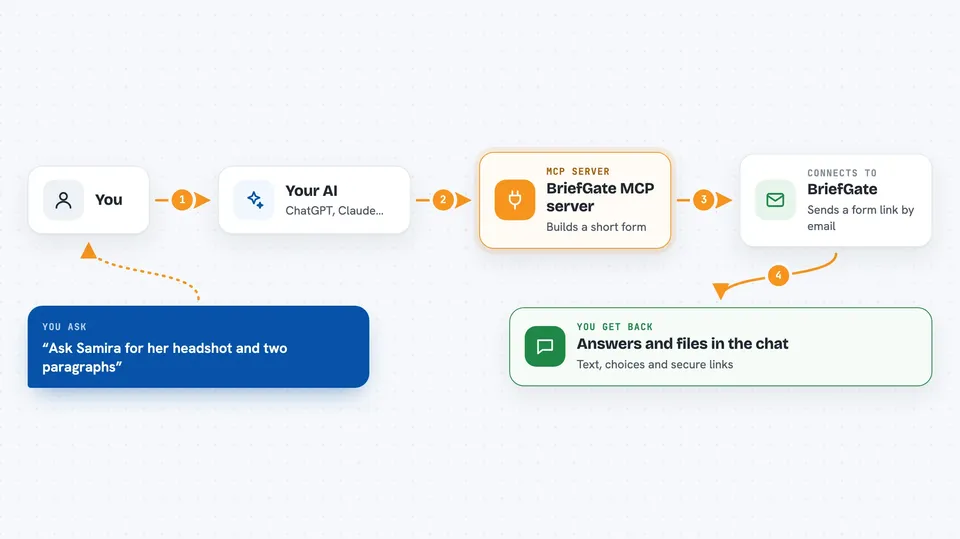
When your AI needs material that isn't anywhere in the chat, it tells BriefGate what to gather, item by item. BriefGate builds a simple online form, emails the link to whoever holds those things, and lets them upload files, type answers or enter secret values without making an account. While everyone waits, your AI carries on with the rest of the job. Once the person submits, BriefGate checks off each item, nudges them again if something stays missing, and marks the collection finished. At that moment your AI pulls the results straight into the conversation.
 Click to zoom
What you can do with it
- Ask a client for logos, photos and documents through an emailed link
- Collect written content such as product blurbs or company background
- Request logins or API keys securely, shown only once
- Get multiple-choice decisions answered by the right person
- Check whether a pending request is filled yet, without bothering anybody
- Retrieve uploaded files along with temporary secure download links
Try asking your AI
- “I'm rebuilding our agency's contact page. Ask Samira at Northwind Ltd for her headshot, two paragraphs about the business, and preferred accent color.”
- “Send my accountant a request asking him to confirm his bank transfer details and attach last quarter's receipts.”
- “Create a checklist for the wedding photographer covering final guest count, shot-list priorities and venue Wi-Fi password, due Friday.”
- “Has Marcus replied with the database backup we asked for three weeks ago?”
What it gives back to you
Once a request finishes, your AI shows you each collected value in readable form: text goes inline in the chat, chosen options come as clear labels, and uploaded files appear as clickable secure links. Anything marked secret displays plainly just once, after which it cannot be viewed again. Until the request completes, checking status simply tells you 'not ready', which means keep going elsewhere.
Before you start
What you need
- A free BriefGate account (signup at briefgate.dev)
- For the installed version: Node.js on your computer
- Nothing extra for the hosted option besides approving sign-in in your browser
Good to know
Secret entries become invisible forever after being displayed once.
Install it with your AI
Add BriefGate MCP server to your AI, no technical skills needed
You don't install anything by hand. You copy one prompt, paste it into an AI that can work on your computer, and it checks, installs and connects the server for you, asking you when it needs something.
Sign in to get the install prompt
Members get a ready-made prompt that lets the Claude desktop app check BriefGate MCP server, install it and connect it for them, step by step. You don't need any technical skills: you copy, paste and answer a few questions. Your connected AI can also find and install any of the 4,609 MCP servers here for you.
Who it's for
Freelance developers, design studios, consultants and team leads who often find themselves pausing projects to chase paperwork or approvals from customers and colleagues.





