
MCP server · Productivity
Time MCP server
by TheoBrigitte
Lets your AI tell the time, convert timezones and work out dates from phrases like next month.
This is a small helper that gives your AI a proper sense of time. It can look up the current time anywhere in the world, convert between timezones, and work out dates from everyday phrases like yesterday or in 45 minutes. It is handy for anyone who schedules meetings, plans travel or deals with colleagues in other countries.
What is an MCP server? The 30-second version
On its own, your AI can only chat. It does not really know what time it is, and it cannot do date maths reliably. An MCP server is a small helper program that gives your AI one new skill or connection. This one connects your AI to a time and date service, so when you ask a time question, the AI passes it to this helper and gets a correct answer back.
What this MCP server does
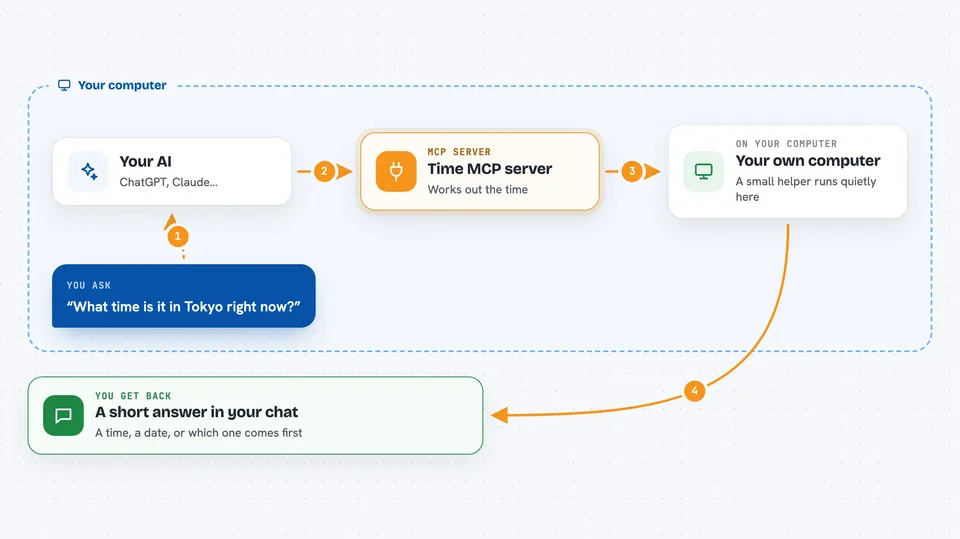
You ask your AI something about time in normal words. The AI sends that question to this helper program running quietly on your computer. The helper works out the answer using real timezone and calendar rules. Then the AI tells you the result in the chat, in plain words. You never have to open the helper yourself or look at any code.
 Click to zoom
What you can do with it
- Ask for the current time in any city or timezone
- Convert a time from one timezone to another
- Work out a date from phrases like yesterday or next month
- Add or subtract a length of time, like 2 hours and 30 minutes
- Compare two times and see which one comes first
- Format a time the way you want it shown
Try asking your AI
- “What time is it in Tokyo right now?”
- “What was the date 3 weeks ago?”
- “Convert 2:30 PM New York time to London time”
- “What time will it be in 45 minutes?”
What it gives back to you
You get a short answer in the chat, like a time, a date, or a simple yes or no. For comparisons it tells you which time comes first. You can also ask for the result in a particular format, and it will show it that way.
Before you start
What you need
- An AI app that supports MCP servers, such as Claude Desktop or Cursor
- Node.js installed if you use the npx method, or Docker if you use the Docker method
Install it with your AI
Add Time MCP server to your AI, no technical skills needed
You don't install anything by hand. You copy one prompt, paste it into an AI that can work on your computer, and it checks, installs and connects the server for you, asking you when it needs something.
Sign in to get the install prompt
Members get a ready-made prompt that lets the Claude desktop app check Time MCP server, install it and connect it for them, step by step. You don't need any technical skills: you copy, paste and answer a few questions. Your connected AI can also find and install any of the 4,609 MCP servers here for you.
Who it's for
Anyone who works across timezones or plans dates, like assistants, project managers, travellers and people with remote teams.





