
MCP server · Notes
Engram MCP server
by tstockham96
Give your AI a long-term memory it can search, so it remembers what matters across chats.
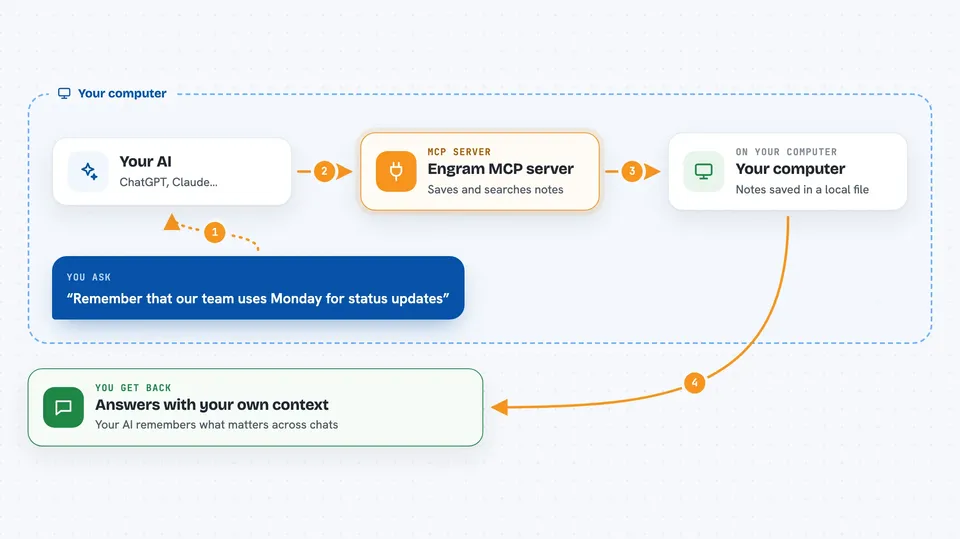
Engram is a memory helper for your AI assistant. It keeps a private notebook of facts, preferences and past events on your own computer, and your AI can look things up in that notebook when you ask. It is handy if you use ChatGPT or Claude often and are tired of repeating the same background every time.
What is an MCP server? The 30-second version
On its own, your AI can only chat with what is in front of it, and it forgets everything when the conversation ends. An MCP server is a small helper program that gives your AI a new skill or a connection to something outside the chat. This one, Engram, connects your AI to a personal memory store on your machine. Once it is set up, your AI can save notes there and pull them back later when they are relevant.
What this MCP server does
You tell your AI something worth keeping, like a preference or a decision you made. Your AI passes that to Engram, which saves it in a local file on your computer and tags the people, projects and topics involved. Later, when you ask a question, your AI asks Engram to search that store and hands back the most relevant notes. Engram can also tidy up over time, merging related notes and flagging ones that seem to disagree. The result is that your AI answers with your own context instead of starting from zero.
 Click to zoom
What you can do with it
- Save a fact, preference or decision so your AI remembers it later
- Ask a question and get an answer built from your saved notes
- Get a short briefing of key facts and open commitments at the start of a session
- See which people, tools and projects come up most in your notes
- Link two related notes together so your AI can follow the connection
- Remove a note you no longer want kept
- Clean up and merge older notes into clearer summaries
Try asking your AI
- “Remember that our team uses Monday for status updates and I prefer short bullet summaries.”
- “What do you know about how I like project plans written?”
- “Give me a quick briefing before my 10am call with the design team.”
- “Forget the note about the old vendor contact, we stopped working with them.”
What it gives back to you
You get answers in plain language in the chat, often with the notes they came from listed underneath. Briefings come back as a short summary plus a few key facts and any open items. When you save something, you get a short confirmation with the note's details. Statistics and entity lists come back as simple counts and names.
Before you start
What you need
- Node.js installed on your computer (the free runtime that runs the tool)
- A Gemini API key from Google (a kind of password for apps; the site gives you one, and there is a free tier)
- The Claude desktop app or another AI app that supports MCP servers
Good to know
It can delete notes if you ask it to forget something, and it sends your text to your chosen AI provider to make the memory work, so keep anything truly sensitive out of it.
Install it with your AI
Add Engram MCP server to your AI, no technical skills needed
You don't install anything by hand. You copy one prompt, paste it into an AI that can work on your computer, and it checks, installs and connects the server for you, asking you when it needs something.
Sign in to get the install prompt
Members get a ready-made prompt that lets the Claude desktop app check Engram MCP server, install it and connect it for them, step by step. You don't need any technical skills: you copy, paste and answer a few questions. Your connected AI can also find and install any of the 4,066 MCP servers here for you.
Who it's for
People who use an AI assistant every day for work and want it to remember their projects, preferences and past decisions without retyping them.




