MCP server · Productivity
WayStation MCP server
Connect your AI to Notion, Slack, Jira, Airtable and other work apps so it can look things up and update them for you.
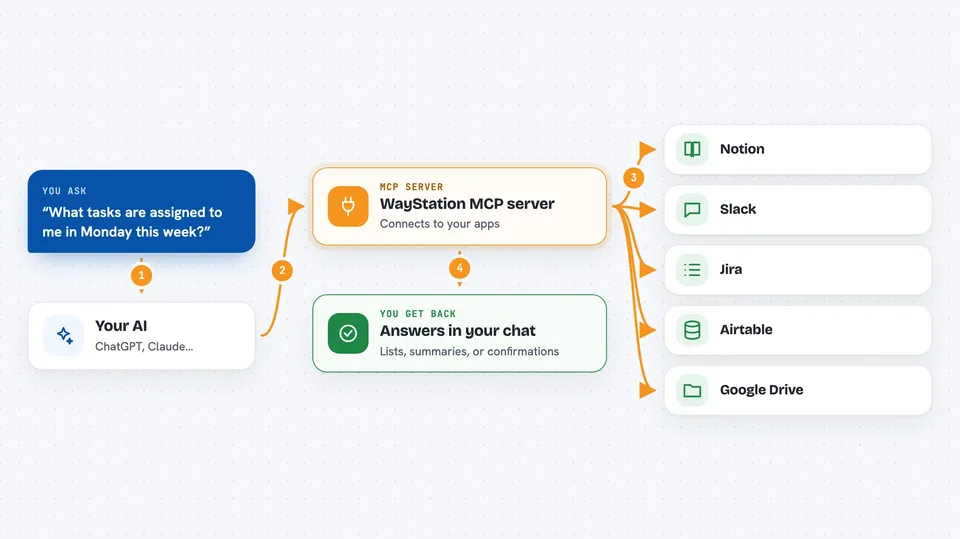
WayStation is a service that links your AI assistant to the apps you already use at work, like Notion, Slack, Monday, Jira, Airtable, Google Drive and more. Once you set it up, you can just ask your AI in normal words to find a page, check a task or post a message, and it will go do it. It is handy for anyone who spends their day jumping between several work tools.
What is an MCP server? The 30-second version
On its own, your AI can only chat with you. It cannot open Notion or send a Slack message by itself. An MCP server is a small helper that gives your AI a new skill or a connection to another service. WayStation is that helper here: it sits between your AI and your work apps, so when you ask for something, your AI passes the request to WayStation and WayStation talks to the app for you.
What this MCP server does
You connect your apps once in the WayStation dashboard, and WayStation gives you a personal web address for your AI. You add that address to your AI app, like Claude. After that, when you ask your AI something like "what is on my Monday board this week", your AI sends the question to WayStation, WayStation asks Monday, and the answer comes back into your chat. You can also ask it to make changes, like adding a task or posting a message, and it will do that too.
 Click to zoom
What you can do with it
- Look up pages, tasks and records in Notion, Monday, Asana, Linear or Airtable
- Search and read files in Google Drive, including Docs and Sheets
- Read and send messages in Slack or Microsoft Teams
- Check and update Jira or Confluence items
- Summarise a board, project or document for you
- Add or change a task, ticket or record in a connected app
- Pull together a quick report from several apps at once
Try asking your AI
- “What tasks are assigned to me in Monday this week?”
- “Find the latest project brief in Google Drive and summarise it”
- “Post a message in the team Slack channel saying the launch is on track”
- “List the open Jira tickets for the mobile app and group them by priority”
What it gives back to you
You get answers right in your chat, in plain words. That can be a list of tasks, a short summary of a document, a table of tickets, or a confirmation that something was added or changed. If you asked it to update an app, it will tell you what it did.
Before you start
What you need
- A WayStation account (you sign up at waystation.ai)
- At least one work app connected in the WayStation dashboard, like Notion or Slack
- Your personal WayStation MCP web address from the dashboard
- An AI app that supports MCP, such as Claude Desktop, Cursor or Cline
Good to know
It can read and change things in your connected apps, so be careful with requests that add, edit or delete items, and only connect apps you are allowed to use this way.
Install it with your AI
Add WayStation MCP server to your AI, no technical skills needed
You don't install anything by hand. You copy one prompt, paste it into an AI that can work on your computer, and it checks, installs and connects the server for you, asking you when it needs something.
Sign in to get the install prompt
Members get a ready-made prompt that lets the Claude desktop app check WayStation MCP server, install it and connect it for them, step by step. You don't need any technical skills: you copy, paste and answer a few questions. Your connected AI can also find and install any of the 4,361 MCP servers here for you.
Who it's for
Office workers, project managers, team leads and anyone who juggles several work apps like Notion, Slack, Jira or Airtable every day.