AI agent for freelancers
Creative Project Quote Agent
A quote that covers the real scope at a healthy margin, sent quickly
What it does
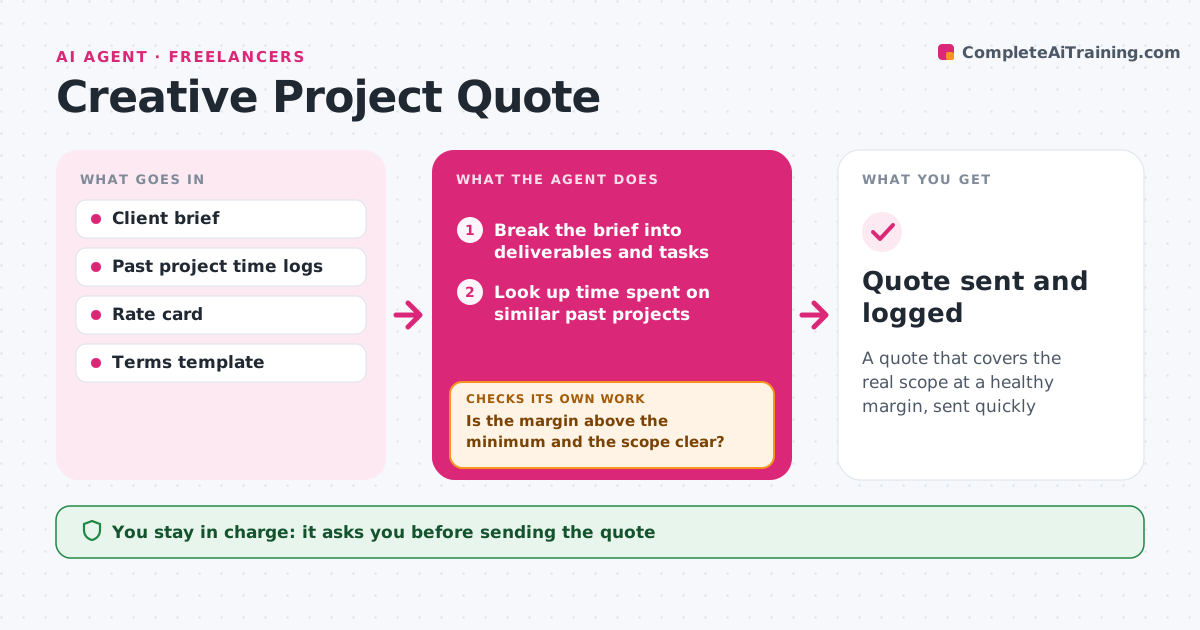
Pricing creative work is hard when every brief is different, and underquoting eats the profit. This agent reads the client brief and breaks it into tasks such as slides, pages, shoot days or edit hours. It looks up the median time spent on similar past projects. It applies your day rate and adds revision rounds, travel, licensing and a rush fee when the deadline is short. It then checks two things: is the margin above your minimum, and is the scope clear? If either fails, it drafts clarifying questions or a reduced-scope option and prices again. It writes the quote with scope, rounds and terms. You approve the quote before it goes out. Edge case: a brief asking for 'a few videos' gets a quote with two clear options instead of a single guess.
How it works
Follow the arrows from top to bottom. The orange dashed arrow is the loop: when a check fails, the agent goes back and tries again.
Read the steps as a list
- New brief arrives
- Break the brief into deliverables and tasks
- Look up time spent on similar past projects
- Calculate price with rates, revisions and extras
- Is the margin above the minimum and the scope clear?If not: draft clarifying questions or a reduced-scope option. Back to step 2.
- Write quote with scope, rounds and terms
- Creative approves the quoteThe agent waits here for your OK.
- Quote sent and logged
How it decides
It estimates each task from the median time of similar past projects and checks the total against the minimum margin. Vague scope triggers options or questions.
- Use median past time for each task type
- Offer two options when scope is vague
- Add a rush fee when the deadline is shorter than the set limit
Make it yours
Every agent is a starting point. You choose these settings for your own situation.
- Day or hourly rate
- Minimum margin (default 30%)
- Revision rounds included
- Rush deadline threshold and fee
What keeps you in control
It always asks you first
- Sending the quote
- Any discount
Hard limits
- Never sends a quote without approval
- Never drops below the minimum day rate
It stops when
- Done: quote approved and sent
- Stop: brief lacks basics like deadline or audience; send questions first
Set it up
We guide you through the set-up, step by step
Members get the full set-up guide for this agent. No technical skills needed: you copy, paste and upload.
- One set of instructions to paste into your AI, with the clicks for ChatGPT, Claude, Microsoft 365 Copilot, Gemini and Grok
- The agent then walks you through connecting your own data, one source at a time
- A downloadable copy with the flow chart, the rules and the full guide