
Learning path
Learning AI as a Meteorologist
Meteorologists turn model data and radar into forecasts and warnings people can act on. This path shows you how to use AI for the first draft, so you can spend more time on the science and the decisions.
Your path
Everything in the Meteorologist AI kit, in the order that makes sense. Members tick off each step and see their progress.
Set up your AI
We guide you through each click.
Let skills do your everyday tasks
Connect your apps and pick your AI apps
Hand whole tasks to AI agents
Build your own tools
Everything for meteorologists
All the courses, certifications, AI tools, MCP servers and apps for meteorologists, most relevant first. Open any list to see more.
Take the prompt courses
A short framework course to learn how to ask, then 9 lessons with ready-to-use prompts for meteorologists.
Start with this framework: how to talk to AI
RACE fits meteorology because it defines role, action, context, and expected quality, such as issuing a precise tornado warning for emergency managers.
Then your prompt course for meteorologists- 1Daily Forecast Drafting3 prompts
- 2Public Forecast Communication3 prompts
- 3Severe Weather Messaging3 prompts
- 4Radar And Satellite Interpretation2 prompts
- 5Model Output Comparison3 prompts
- 6Emergency Services Coordination2 prompts
- 7Verification And Post-Event Reports2 prompts
- 8Climate Trend Summaries2 prompts
- 9Shift Handoff And Training2 prompts
Watch the video courses or add them to your Favorites for later
75 video courses our AI picked for meteorologists, most useful first. Save the ones you want to watch later with the heart.
Favorites are saved to your account: sign in or get your AI kit first.
Show all 75 video courses
Get certified, or add certifications to your Favorites
Every course ends in an exam and a certificate you can add to LinkedIn. Save the certifications you are aiming for with the heart.
Favorites are saved to your account: sign in or get your AI kit first.
More certifications for meteorologistsShow all 24 certifications
Try the AI tools for meteorologists
5 AI tools our AI matched to the work of meteorologists, best fit first. Each review shows what it does, its alternatives and the jobs it suits.
Favorites are saved to your account: sign in or get your AI kit first.
Connect your AI to the apps meteorologists use
MCP servers let ChatGPT, Claude or Copilot look things up and get work done in other apps, like your email, calendar or bookkeeping software. These 10 fit the work of meteorologists best, well-known apps first.

arXiv MCP server
by andybrandtLets your AI search arXiv for research papers and pull up their details and full text.
ResearchNo install
Scholar MCP server
by Liyux3Your AI can search academic papers, read them, map citations, and save them into a personal library.
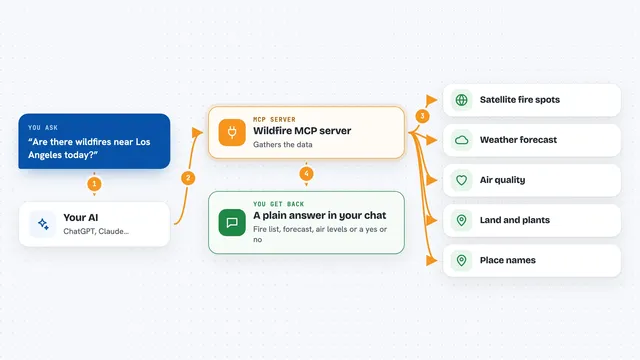
Wildfire MCP server
by aliafsahnoudehLets your AI check satellite fire hotspots, weather, air quality, and land cover anywhere on Earth.

OpenAI Web Search MCP server
by ConechoAILets your AI search the web for fresh information and reason through the results before answering.

GNU Units MCP server
by laszlopereLets your AI convert between thousands of units and check unit math, all offline.

Jupyter Notebook MCP server
by jjsantos01Let your AI write and run code inside your Jupyter Notebook, cell by cell, and read the results.
Show all 10 MCP servers

IMGW Polish Weather MCP server
by bartosz-kucAsk your AI for live Polish weather, river levels and storm warnings straight from IMGW.

Fermat MCP server
by abhiphileLets your AI do math and draw charts for you, from simple sums to equations and graphs.
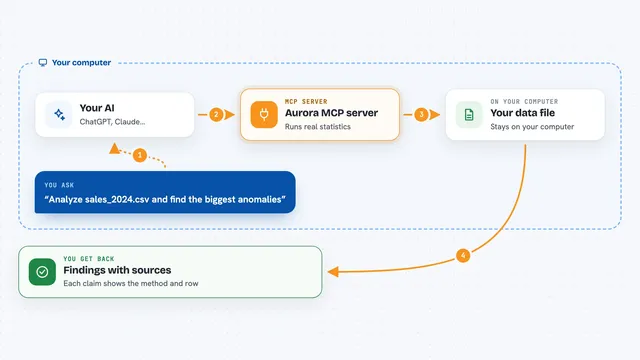
Aurora MCP server
by FantasyLab-aiLet your AI run honest statistics on your data and cite every finding, instead of guessing.

MCP Dashboards
by KyuRishYour AI can turn plain numbers into interactive charts and dashboards right inside the chat.















































































About this learning path
7 topicsAI for Meteorologists: Forecast, Warn, Explain
Meteorology runs on data and deadlines. You read models, watch radar, write discussions, and warn people, often all at once. AI can take the first pass at the words so you can spend more time on the science and the decisions.
This learning path is built for working meteorologists. It starts with setup, connects your AI tools, adds skills for your job, then walks through a short prompt course and video lessons chosen for forecasting, warnings, and climate work.
Why AI matters for meteorology now
Forecasts reach the public faster than ever, and people expect clear answers on many channels. AI helps you turn model output and radar notes into plain language drafts without losing your judgment.
It also helps with the parts of the job that pile up: briefings, warnings, handoffs, and post-event reports.
What this path includes
You start with setup questions and connecting your AI assistant. Then you learn skills for the job inside your AI, take the prompt course, and watch video lessons chosen for meteorology.
The path ends with certifications from those video courses, so you have something to show for the work.
How it saves you time
Drafting a forecast discussion, a warning, or a briefing can take a big part of your shift. With good prompts, the first draft appears in seconds and you edit from there.
That time goes back to analysis, coordination, and the moments when your expertise matters most.
How it protects your career
AI will not replace the meteorologist who knows the atmosphere, the local terrain, and the people who depend on the forecast. It will change how the words get written.
Learning to direct these tools keeps you in charge of the message and the warning, which is where your value lives.
Keeping your expertise in charge
Every prompt in this path is a starting point, not a final product. You check the numbers, the timing, and the tone before anything goes out.
The goal is a faster first draft and a clearer final one, with your name on it.
How to start this week
Pick one task you do every shift, like the morning forecast discussion. Try one prompt from the course and see what comes back.
Then add a second task, like the severe weather message or the handoff note. Small steps build the habit.
Frequently asked questions
Do I need to be technical to use AI?
No. If you can write a clear sentence about the weather, you can write a prompt. The course shows you the pattern and gives you examples to copy and adjust.Will AI replace meteorologists?
No. AI can draft words and summarize data, but it cannot read the sky, weigh local risk, or take responsibility for a warning. Your judgment stays at the center.Is it safe to put weather data into an AI tool?
Use the same care you use with any work system. Follow your agency rules, avoid private or sensitive details, and keep the final check with a person.How long does the learning path take?
Most people move through the setup and prompt course in a few short sittings. The video lessons and certifications can fit around shifts, at your own pace.