MCP server · Apple, iOS and Mac
LMCP local MCP server
by lanchuske
Let your AI read and act on your Mac apps like Mail, Calendar, Notes and Messages.
LMCP is a small helper that connects your AI assistant to the apps already on your computer, like Mail, Calendar, Contacts, Reminders, Notes, Messages, Finder, Safari, Outlook, Teams and OneDrive. You ask a question in plain words, and your AI can look things up in those apps and sometimes make changes for you. It is handy if you spend your day jumping between email, calendar and files and wish your AI could see all of it at once.
What is an MCP server? The 30-second version
On its own, your AI can only chat with you. It cannot open your email or check your calendar. An MCP server is a small helper program that gives your AI a new skill or a connection to an app. LMCP is that helper for your Mac apps, so when you ask your AI to find something in your Mail or add a reminder, it can actually do it.
What this MCP server does
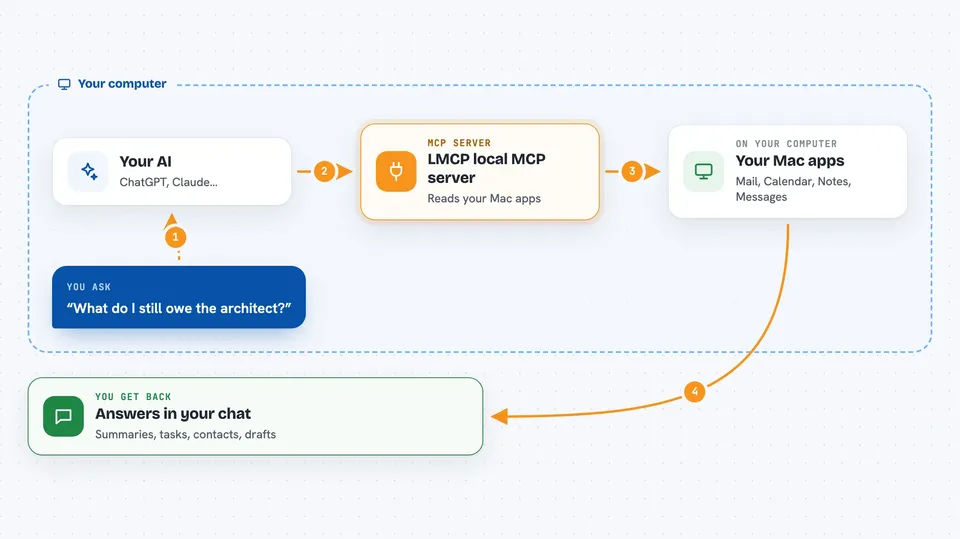
You type a request to your AI, like asking what you owe someone or what your day looks like. Your AI passes that request to LMCP running on your computer. LMCP then talks to the apps you allowed, such as Mail, Calendar or Notes, and gathers what it finds. Your AI reads that information and writes an answer back to you in the chat. For some actions, like creating a reminder or drafting a reply, it can also make the change if you approve it.
 Click to zoom
What you can do with it
- Search your email and messages to find what someone asked you for
- Check your calendar and tasks to help plan your day
- Look up a contact's details in your Contacts app
- Read and summarize notes you have saved
- Find files on your computer with Finder
- Draft replies to emails or messages
- Create reminders or tasks when you ask
Try asking your AI
- “Tell me everything I still owe the architect, I can't remember her name”
- “Help me organize my day so I can meet my commitments”
- “Find the last email from my landlord and summarize what he wants”
- “Add a reminder to call the bank tomorrow morning”
What it gives back to you
You get answers written in plain language in your chat, like a short summary of emails, a list of tasks, or details about a contact. When it makes a change, such as adding a reminder, it tells you what it did. Sometimes it shows you a draft before sending anything. Everything appears right in the conversation, so you do not have to switch apps.
Before you start
What you need
- A Mac running macOS 13 or newer, or a Windows 10+ (64-bit) PC
- The LMCP app installed from the download page
- A compatible AI assistant like Claude, ChatGPT, Cursor or Codex
- Permission to access the apps you want to connect, like Mail or Calendar
Good to know
It can read your private email, messages and files, and it can make changes like sending messages or creating reminders, so check what it is about to do before you approve it.
Install it with your AI
Add LMCP local MCP server to your AI, no technical skills needed
You don't install anything by hand. You copy one prompt, paste it into an AI that can work on your computer, and it checks, installs and connects the server for you, asking you when it needs something.
Sign in to get the install prompt
Members get a ready-made prompt that lets the Claude desktop app check LMCP local MCP server, install it and connect it for them, step by step. You don't need any technical skills: you copy, paste and answer a few questions. Your connected AI can also find and install any of the 4,361 MCP servers here for you.
Who it's for
Office workers who live in email, calendar and notes all day and want their AI to help without copying and pasting between apps.