
MCP server · Productivity
CalDAV Calendar MCP server
by madbonez
Let your AI read and create calendar events on Yandex, Google, Nextcloud, iCloud and other CalDAV calendars.
This is a small helper that connects your AI assistant to your calendar. It works with any calendar that speaks CalDAV, which includes Yandex Calendar, Google Calendar, Nextcloud, ownCloud, Apple iCloud and FastMail. It is handy if you want to ask your AI things like what is on your schedule today, or to add a meeting without opening your calendar app.
What is an MCP server? The 30-second version
On its own, your AI can only chat. An MCP server is a small helper program that gives your AI a new skill or a connection to an app. This one connects your AI to your calendar account, so the AI can look up events or add new ones for you when you ask. You stay in the chat, and the helper does the calendar work behind the scenes.
What this MCP server does
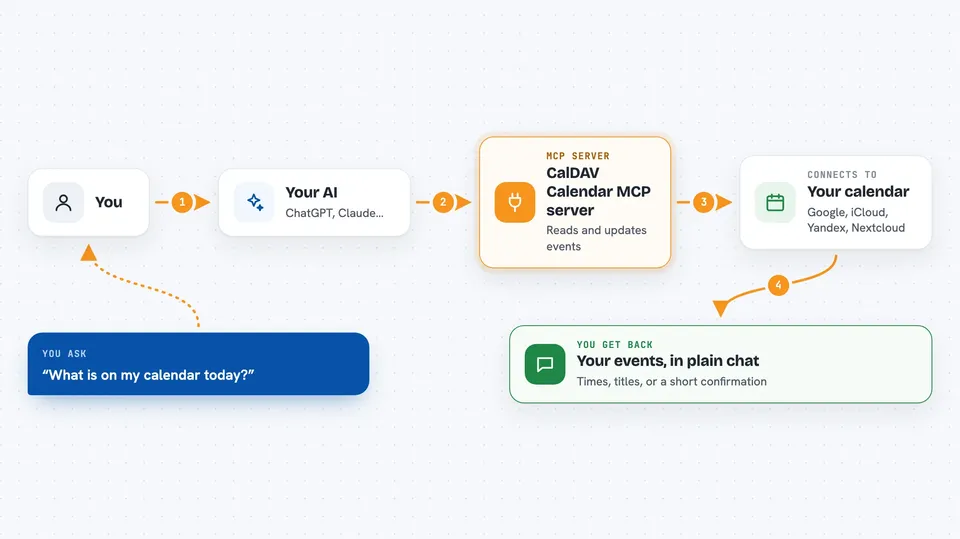
You ask your AI something about your calendar, like what is on today or to add a meeting. The AI sends that request to this helper. The helper talks to your calendar server using a standard called CalDAV. Your calendar server answers, and the helper passes the result back to the AI. The AI then tells you what it found or confirms what it created.
 Click to zoom
What you can do with it
- List all the calendars in your account
- Create a new event with a title, time and place
- Add reminders so you get a nudge before the event
- Invite attendees and track who accepted
- Repeat an event daily, weekly, monthly or yearly
- See what is on your schedule today or this week
- Search your events by text, person or location
- Delete an event you no longer need
Try asking your AI
- “What is on my calendar today?”
- “Add a meeting with Anna on Friday at 3pm for one hour, with a reminder 15 minutes before.”
- “Show me all events this week that mention the word 'budget'.”
- “Create a recurring team standup every weekday at 9:30am.”
What it gives back to you
You get answers in plain chat text. For example, a list of events with their times and titles, or a short confirmation that a new event was created. If you search, you get the matching events. If you ask about today or this week, you get just those events.
Before you start
What you need
- A calendar account that supports CalDAV (Yandex, Google, Nextcloud, iCloud and others do)
- Your calendar username and password, sometimes an app-specific password
- The web address of your calendar server (the README lists common ones)
- A tool that can run MCP servers, like Cursor or another MCP-compatible app
Good to know
This helper can create and delete real calendar events, so double-check before you let it remove something important.
Install it with your AI
Add CalDAV Calendar MCP server to your AI, no technical skills needed
You don't install anything by hand. You copy one prompt, paste it into an AI that can work on your computer, and it checks, installs and connects the server for you, asking you when it needs something.
Sign in to get the install prompt
Members get a ready-made prompt that lets the Claude desktop app check CalDAV Calendar MCP server, install it and connect it for them, step by step. You don't need any technical skills: you copy, paste and answer a few questions. Your connected AI can also find and install any of the 4,361 MCP servers here for you.
Who it's for
Anyone who lives in their calendar and wants to ask an AI to check or add events without switching apps.





