
MCP server · Productivity
CalDAV Calendar MCP server
by ni-c
Let your AI read and change your calendar, tasks and dated notes on your own CalDAV server.
This is a small helper that connects your AI assistant to your own calendar server. It works with the open CalDAV standard, which is what Nextcloud, Radicale, Fastmail, mailbox.org and iCloud use behind the scenes. It is handy if you keep your calendar on one of those and want your AI to look things up or add entries for you.
What is an MCP server? The 30-second version
On its own, your AI can only chat. An MCP server is a small helper program that gives it a new skill or a connection to an app. This one connects your AI to your CalDAV calendar, so when you ask about your week or want a meeting added, the AI can actually go and look or make the change on your server. Nothing goes through a company in the middle: the helper talks straight to the calendar account you already have.
What this MCP server does
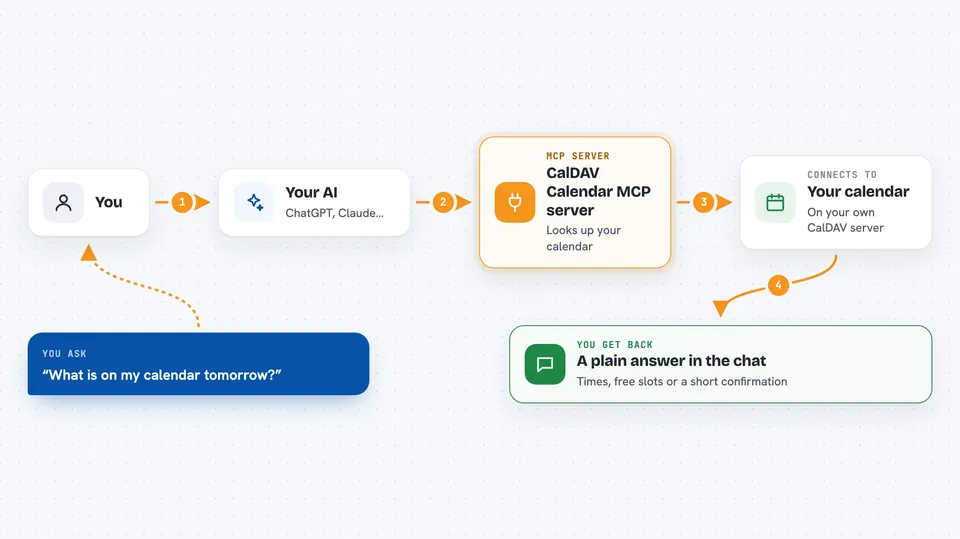
You ask your AI something about your calendar, like what is on tomorrow or when you are free. The AI passes that request to this helper. The helper logs into your CalDAV server with the details you gave it, fetches or changes what you asked for, and hands the result back. Your AI then turns it into a normal answer in the chat. If a change would affect other people or a whole repeating series, it asks you first before doing it.
 Click to zoom
What you can do with it
- List your calendars and see what events are on
- Find a free slot in your day or week
- Create a new event with a title, time and place
- Move or update an existing event
- Keep a to-do list with tasks and mark them done
- Write dated journal or note entries
- Answer an invitation by changing your own status
Try asking your AI
- “What is on my calendar tomorrow?”
- “Find me a free hour on Thursday afternoon and book a call with Sam”
- “Move my 3pm meeting to Friday at 10”
- “Add a task to buy birthday presents before Saturday”
- “Do I have anything on the 14th of September?”
What it gives back to you
You get back plain answers in the chat: a list of events with their times, a free slot suggestion, or a short confirmation that something was created, moved or marked done. Each entry comes with its time, its time zone and whether it lasts all day. When a change touches a whole repeating series or deletes something, the AI asks you to confirm before it goes ahead.
Before you start
What you need
- A CalDAV calendar account (Nextcloud, Radicale, Baikal, SOGo, Fastmail, mailbox.org or iCloud)
- An app-specific password from that service (a one-time password just for this app, not your main login)
- Node.js 22 or newer, or Docker, on the computer running your AI app
Good to know
It can change and delete entries in your calendar, so it asks you to confirm before anything irreversible, and you can set it to read-only if you prefer.
Install it with your AI
Add CalDAV Calendar MCP server to your AI, no technical skills needed
You don't install anything by hand. You copy one prompt, paste it into an AI that can work on your computer, and it checks, installs and connects the server for you, asking you when it needs something.
Sign in to get the install prompt
Members get a ready-made prompt that lets the Claude desktop app check CalDAV Calendar MCP server, install it and connect it for them, step by step. You don't need any technical skills: you copy, paste and answer a few questions. Your connected AI can also find and install any of the 4,609 MCP servers here for you.
Who it's for
Anyone who keeps their calendar on a CalDAV server and wants their AI to read it or make small changes without opening a web calendar.





