MCP server · Email
Open-Xchange MCP server
by Rheopyrin
Lets your AI read and send email, manage calendars, contacts and mail filters on your Open-Xchange account.
This is a helper for people who use Open-Xchange webmail or a similar standards-based mail service. Once it is connected, your AI assistant can look at your inbox, send and reply to messages, handle calendar events and check contacts for you. It is handy if you spend a lot of your day in email and calendars and want to ask for things in plain words instead of clicking around.
What is an MCP server? The 30-second version
On its own, your AI can only chat. An MCP server is a small helper program that gives your AI a new skill, here a connection to your Open-Xchange mail, calendar and contacts. You set it up once with your account details, and after that your AI can look things up or make changes there when you ask. Think of it as giving your assistant a key to your mailbox and calendar, but only for the actions you switch on.
What this MCP server does
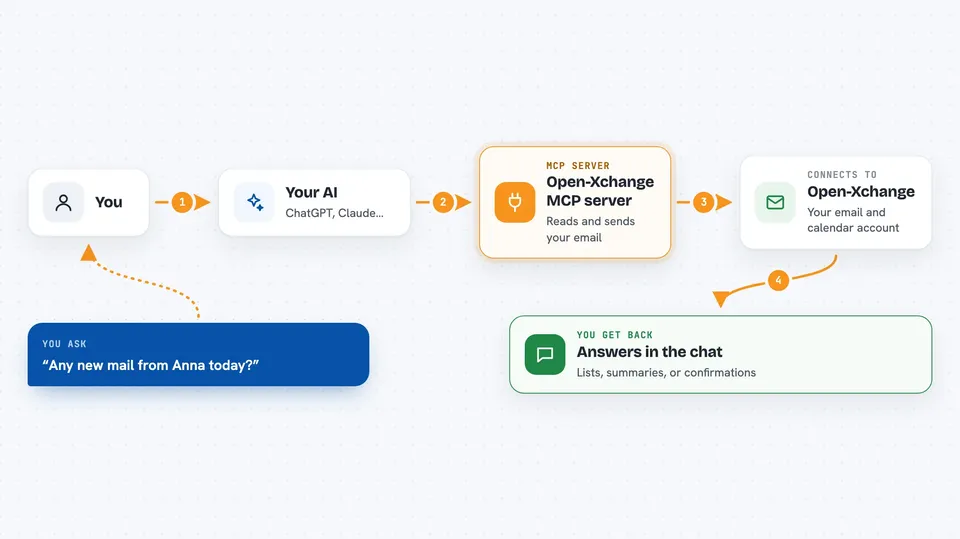
You ask your AI something like "any new mail from Anna today?" or "book a meeting Friday at 10". The AI passes that request to this helper program, which talks to your mail server or calendar server using standard email and calendar rules. The server answers, and the helper hands the result back to the AI. The AI then writes it up for you in the chat, as a list, a summary or a short confirmation that something was sent or changed.
 Click to zoom
What you can do with it
- List your mail folders and read or search messages across them
- Send, reply to and forward email, or save a draft
- Move, flag, archive, mark as read or delete messages
- Create and edit server-side mail filters that sort incoming mail
- List calendars and events, and create, update or delete events
- Accept, decline or tentatively reply to meeting invitations
- Look up contacts and check when a colleague is free or busy
Try asking your AI
- “Show me any unread email from today”
- “Search all folders for messages about the budget”
- “Create a meeting on my work calendar for Tuesday at 2pm with Anna”
- “Is Marco free tomorrow afternoon?”
- “Add a filter that moves newsletters to a News folder”
What it gives back to you
You get answers written in the chat, usually as short lists or summaries. For email you might see sender, subject and a snippet, or the full text of one message. For calendars you get event titles, times and locations, and for contacts you get names, emails and phone numbers. When you ask it to send or change something, it tells you what it did.
Before you start
What you need
- An Open-Xchange or standards-based mail account (IMAP/SMTP, CalDAV, CardDAV)
- An app password from your mail provider (a special password for apps, separate from your normal login)
- Node.js installed on your computer to run the helper
- The Claude desktop app or another MCP-compatible AI app
Install it with your AI
Add Open-Xchange MCP server to your AI, no technical skills needed
You don't install anything by hand. You copy one prompt, paste it into an AI that can work on your computer, and it checks, installs and connects the server for you, asking you when it needs something.
Sign in to get the install prompt
Members get a ready-made prompt that lets the Claude desktop app check Open-Xchange MCP server, install it and connect it for them, step by step. You don't need any technical skills: you copy, paste and answer a few questions. Your connected AI can also find and install any of the 4,609 MCP servers here for you.
Who it's for
Office workers who live in Open-Xchange webmail and calendars and want their AI to handle the routine email and scheduling chores.