MCP server · Generative art
gen-image MCP server
by yuluo688
Let your AI create and edit images using your own image API, saving files straight into your project folder.
This is a small helper that lets your AI make and edit pictures for you. You bring your own image service (like an OpenAI-style or Gemini image API), and the finished images land right in your project folder. It is handy for anyone who wants pictures generated while they work, without leaving their chat.
What is an MCP server? The 30-second version
On its own, your AI can only chat. An MCP server is a small helper program that gives your AI a new skill or a connection to a service, and here it connects your AI to your own image-making service. Once it is set up, you just ask your AI for a picture, and the helper does the actual work of talking to that service. You never touch the technical parts yourself.
What this MCP server does
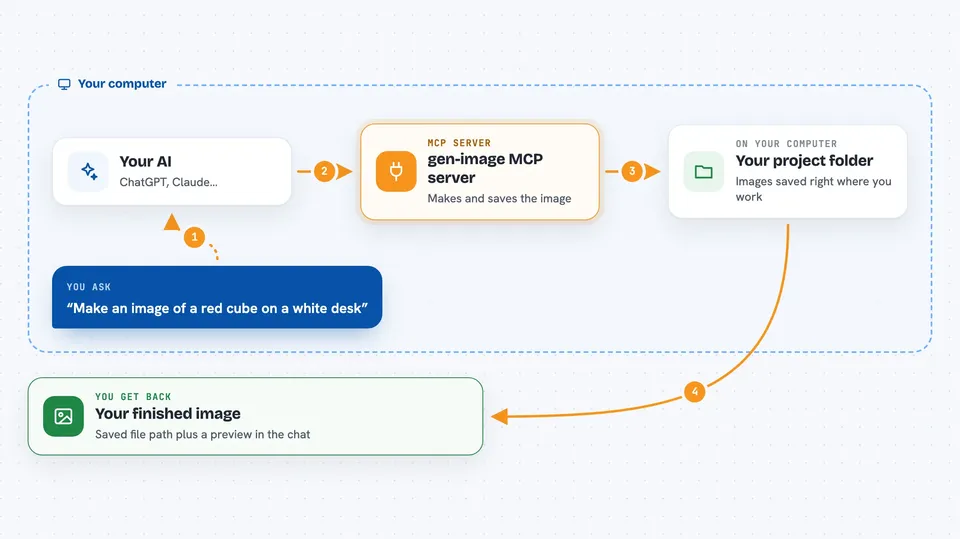
You ask your AI for an image, like a red cube on a white desk. Your AI passes that request to this helper. The helper sends it to the image service you configured, using your own address, key, and model. When the picture comes back, the helper saves it into your project folder and shows you a preview. If one model is busy or fails, it can try the next one you listed.
 Click to zoom
What you can do with it
- Create a brand new image from a text description
- Edit an existing local image, like changing the sky to a sunset
- Combine or use a local reference image to guide the result
- Save finished images directly into your project folder
- See a preview of the image right in the chat
- List which image models you have set up
- Let it automatically try another model if one fails
Try asking your AI
- “Make me an image of a red cube on a white desk with soft light and save it to exports/cube.png”
- “Edit inputs/photo.png and change the sky to a sunset, keeping the building details”
- “Turn this sketch into a watercolor painting, use a 16:9 shape”
- “Which image models do I have configured right now?”
What it gives back to you
You get back the saved file path and a link to the image, plus a small preview in the chat when the image is not too large. It also tells you which model actually worked, how long it took, and how many tries happened. If something failed, you get a clear error message instead of a picture.
Before you start
What you need
- Node.js installed, version 20 or newer (24 LTS suggested)
- An image service address, an API key, and at least one model name from that service
- An MCP client that supports stdio, like the Claude desktop app
Good to know
Each image request can cost money on your image service, and retries or model switching may add extra charges, so watch your usage.
Install it with your AI
Add gen-image MCP server to your AI, no technical skills needed
You don't install anything by hand. You copy one prompt, paste it into an AI that can work on your computer, and it checks, installs and connects the server for you, asking you when it needs something.
Sign in to get the install prompt
Members get a ready-made prompt that lets the Claude desktop app check gen-image MCP server, install it and connect it for them, step by step. You don't need any technical skills: you copy, paste and answer a few questions. Your connected AI can also find and install any of the 4,361 MCP servers here for you.
Who it's for
People who make things and want images generated or edited on the fly, like developers, designers, and writers working inside an AI chat.