
MCP server · API
AnythingMCP gateway
by HelpCode-ai
Turn your company's APIs and databases into tools your AI can use, without writing code.
AnythingMCP is a helper you run yourself that connects your AI assistant to the systems your company already uses, like your online shop, your accounting software or your database. You set it up once, then your AI can look things up and do small tasks in those systems when you ask. It is handy for people who work with business software every day but are not programmers.
What is an MCP server? The 30-second version
On its own, your AI can only chat with you. An MCP server is a small helper program that gives your AI a new skill or a connection to an app or service. AnythingMCP is that helper, and it connects your AI to things like your shop system, your ERP or your database. Once it is connected, your AI can look things up or make changes there for you when you ask.
What this MCP server does
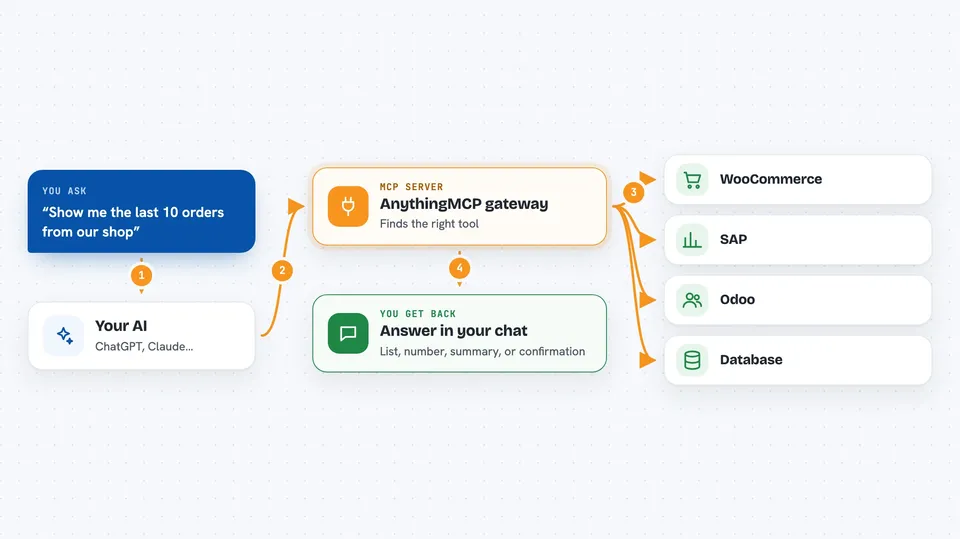
You add a connection in AnythingMCP, either by picking a ready-made one from a catalog or by pointing it at your own API or database. AnythingMCP then turns each operation into a tool your AI can call. When you ask your AI a question, it uses that tool, AnythingMCP talks to the system for you, and the answer comes back in your chat. You decide which tools the AI can see and which roles may use them.
 Click to zoom
What you can do with it
- Look up orders, invoices or customers in your shop or ERP system
- Read data from your SQL or MongoDB database without writing queries
- Import an OpenAPI, SOAP or GraphQL API and use it as AI tools
- Create or update records in supported systems, like a sales order
- Connect another MCP server and serve its tools next to your own
- Control which tools each role in your team can call
Try asking your AI
- “Show me the last 10 orders from our WooCommerce shop”
- “How many items do we have in stock for product X in SAP?”
- “Find the customer with email jane@example.com in Odoo”
- “List all invoices from last month in our database”
What it gives back to you
You get answers in your normal chat with the AI. That can be a list of orders, a number, a short summary, or a confirmation that a record was created or updated. AnythingMCP does not show you a separate screen; the AI just tells you what it found or did.
Before you start
What you need
- Docker 24 or newer and the openssl command
- A computer or server to run it on (it can run on your own laptop)
- Login details for the systems you want to connect, like an API key or database password
Good to know
It can read and, in some connectors, create or update records in your business systems, so check what each tool is allowed to do before you connect it.
Install it with your AI
Add AnythingMCP gateway to your AI, no technical skills needed
You don't install anything by hand. You copy one prompt, paste it into an AI that can work on your computer, and it checks, installs and connects the server for you, asking you when it needs something.
Sign in to get the install prompt
Members get a ready-made prompt that lets the Claude desktop app check AnythingMCP gateway, install it and connect it for them, step by step. You don't need any technical skills: you copy, paste and answer a few questions. Your connected AI can also find and install any of the 4,361 MCP servers here for you.
Who it's for
Office workers and teams who use business software like shops, ERPs or databases and want their AI to work with that data without asking IT for a custom integration.


