
MCP server · Developer tools
ClarifyPrompt MCP server
by LumabyteCo
Your AI rewrites your rough prompt into a polished one tuned for the exact tool you're using.
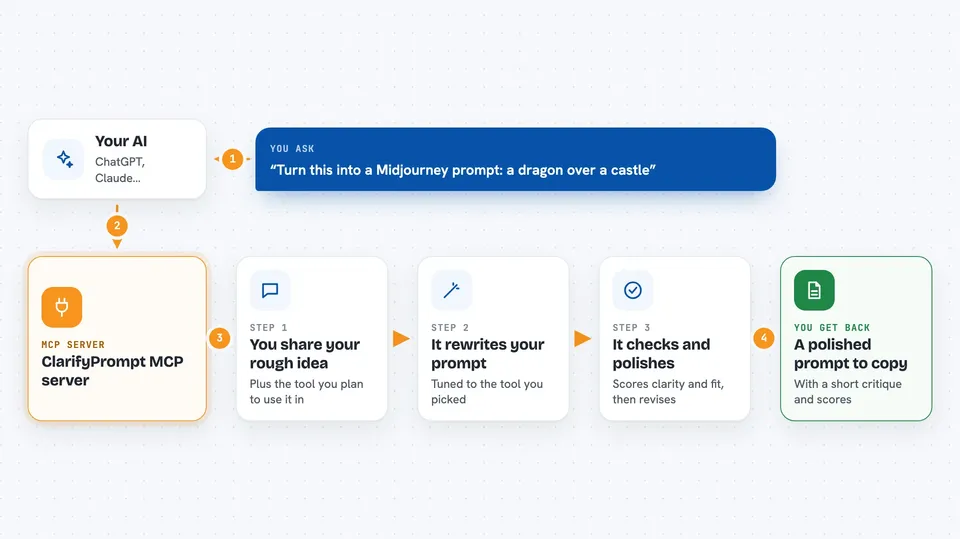
ClarifyPrompt is a helper that takes a vague request you typed and turns it into a clear, well-shaped prompt for the AI tool you actually want to use. It knows the quirks of over 60 tools, from Midjourney and DALL-E to Cursor and ChatGPT. It's handy if you use AI tools often and don't want to keep guessing the right wording.
What is an MCP server? The 30-second version
On its own, your AI can only chat with you. An MCP server is a small helper program that gives your AI a new skill or a connection to another service. This one connects your AI to ClarifyPrompt, a prompt-improving service. So when you ask for a better prompt, your AI hands your words to ClarifyPrompt, and ClarifyPrompt sends back a version tuned for the tool you named.
What this MCP server does
You type a rough idea, like a dragon over a castle, and tell your AI which tool you'll use it in. Your AI passes that to ClarifyPrompt along with any context it can see, like the file you have open or your project settings. ClarifyPrompt figures out what you're really trying to do and rewrites your prompt in the style that tool prefers. Then it hands the polished prompt back to your AI, which shows it to you in the chat. You copy it and paste it into Midjourney, Cursor, or wherever you're working.
 Click to zoom
What you can do with it
- Rewrite a rough prompt into one tuned for a specific tool
- Add the right settings and flags for image tools like Midjourney
- Ground a coding prompt in the file and project you have open
- Score your prompt on clarity, specificity, and fit for the format
- Run the whole improve-then-check-then-revise loop in one go
- Keep the wording plain and everyday instead of stiff and formal
- Show a side-by-side before and after of your prompt
Try asking your AI
- “Turn this into a Midjourney prompt: a dragon flying over a castle at sunset”
- “Optimize this for Cursor: add a configurable request timeout to the http transport”
- “Critique my prompt and tell me what's weak about it”
- “Rewrite this for ElevenLabs: a calm narrator reading a bedtime story”
What it gives back to you
You get back a rewritten prompt, ready to copy and paste. Along with it you may see a short critique with scores on things like clarity and specificity, and a note about which platform the rewrite was tuned for. In some apps you also get a small panel showing your original prompt next to the improved one, with buttons to accept it or ask for changes.
Before you start
What you need
- An AI app that can connect to MCP servers, like Claude Desktop, ChatGPT, Cursor, or VS Code
- Access to an AI model that ClarifyPrompt can call (it works with many providers, local or hosted)
Good to know
It sends your prompt and some workspace details to an AI model to do the rewriting, so avoid pasting secrets or private information you wouldn't want processed.
Install it with your AI
Add ClarifyPrompt MCP server to your AI, no technical skills needed
You don't install anything by hand. You copy one prompt, paste it into an AI that can work on your computer, and it checks, installs and connects the server for you, asking you when it needs something.
Sign in to get the install prompt
Members get a ready-made prompt that lets the Claude desktop app check ClarifyPrompt MCP server, install it and connect it for them, step by step. You don't need any technical skills: you copy, paste and answer a few questions. Your connected AI can also find and install any of the 4,361 MCP servers here for you.
Who it's for
Anyone who uses AI tools often and wants better results without learning each tool's special wording, especially writers, designers, and developers.



