
MCP server · Notes
Memory MCP server
Gives your AI a lasting memory so it remembers facts about you and your work between chats.
This is a small helper that gives your AI a memory. Normally, when you close a chat, your AI forgets everything you told it. With this connected, it can keep notes about you, the people you work with, and your projects, and bring them back up next time.
What is an MCP server? The 30-second version
On its own, your AI can only chat with you in the moment. An MCP server is a small helper program that gives your AI one new skill. This one gives your AI a memory that lives on your own computer, so it can save facts and look them up again later. You do not need to understand how it works inside. You just connect it once, and your AI quietly uses it when you ask it to remember or recall something.
What this MCP server does
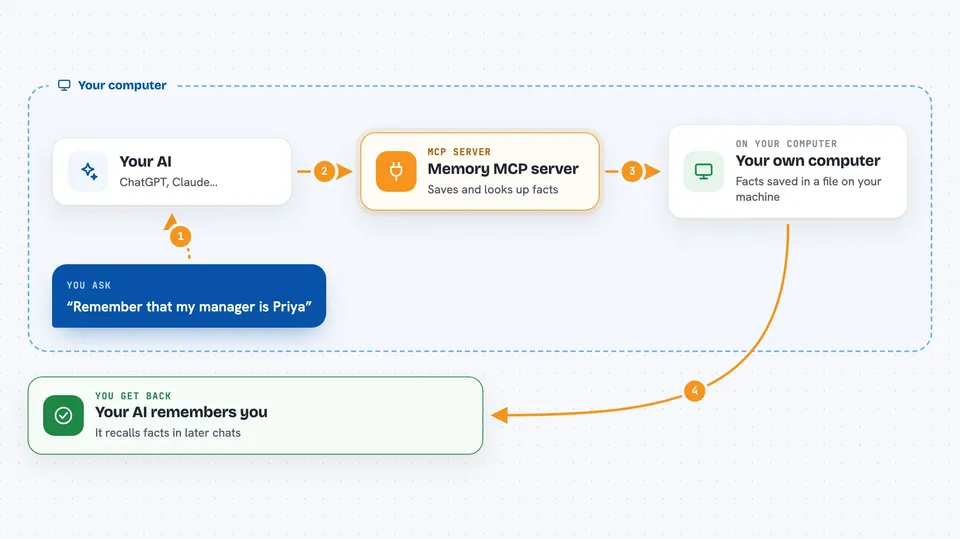
You tell your AI something worth remembering, like a colleague's name or how you like your updates written. The AI passes that fact to this helper, which saves it in a simple file on your computer. Later, in a new chat, you ask what it knows about that person or project, and the AI asks the helper to look it up. The helper sends the facts back, and the AI explains them to you in plain words. It also keeps track of how people and things are connected, for example that someone works at a certain company.
 Click to zoom
What you can do with it
- Remember facts about you, like your role, your preferences, and how you like answers written
- Keep track of people you work with and how they relate to each other
- Store notes about projects, clients, or events you mention
- Look up what it already knows about a person or topic when you ask
- Update a fact when something changes, like a new job title
- Remove a fact or a person you no longer want it to remember
- Show you everything it has saved so far
Try asking your AI
- “Remember that my manager is Priya and she prefers short email updates.”
- “What do you know about the Riverside project?”
- “Add that Tom moved from marketing to sales last month.”
- “Forget that I mentioned the old supplier.”
What it gives back to you
You get answers in the chat, in normal sentences. When it saves something, it usually just confirms it in a line or two. When you ask it to recall, it gives you a short list of the facts it has, or a summary of who is connected to what. You can also ask to see everything it has stored, and it will show you the full list.
Before you start
What you need
- The Claude desktop app or VS Code with MCP support
- Node.js installed on your computer if you use the npx option, or Docker if you use that option
Good to know
It saves personal notes about you and the people you mention in a plain file on your computer, so keep that in mind if you share the machine or the file.
Install it with your AI
Add Memory MCP server to your AI, no technical skills needed
You don't install anything by hand. You copy one prompt, paste it into an AI that can work on your computer, and it checks, installs and connects the server for you, asking you when it needs something.
Sign in to get the install prompt
Members get a ready-made prompt that lets the Claude desktop app check Memory MCP server, install it and connect it for them, step by step. You don't need any technical skills: you copy, paste and answer a few questions. Your connected AI can also find and install any of the 4,066 MCP servers here for you.
Who it's for
Anyone who uses their AI often and is tired of repeating the same background details in every new chat.




