MCP server · Productivity
Timergy MCP server
by timergy-app
Let your AI create scheduling polls, collect votes, and lock in the winning time for you.
Timergy is a scheduling poll app, a bit like Doodle. You pick a few possible times, share a link, and everyone marks when they are free. This MCP server lets your AI assistant create those polls, vote on them, and finalize the best time for you, just by asking in plain words.
What is an MCP server? The 30-second version
On its own, your AI can only chat with you. An MCP server is a small helper program that gives your AI a new skill or a connection to another service. This one connects your AI to Timergy, the scheduling poll app. So when you ask your AI to set up a poll or check who voted, it can actually do that for you.
What this MCP server does
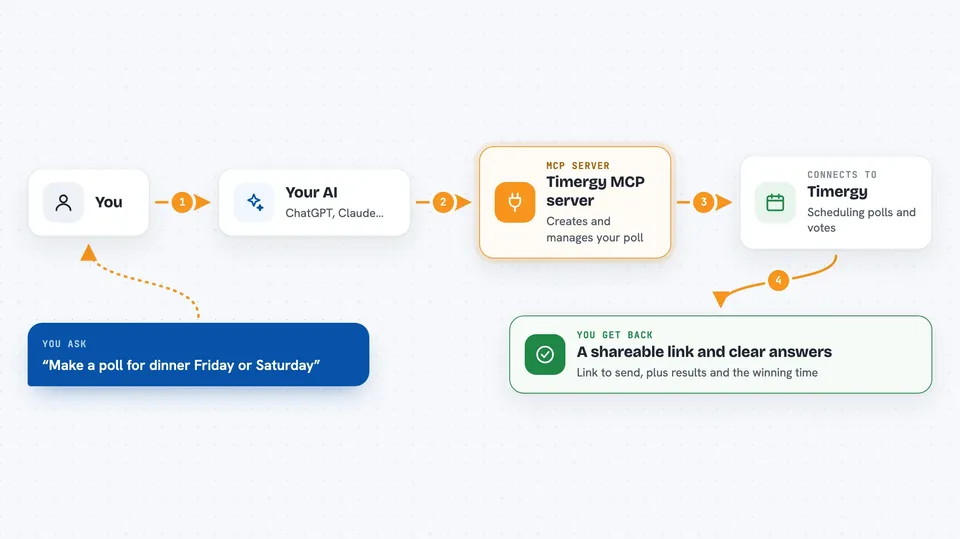
You tell your AI what you need, like a poll for dinner next Friday or Saturday. The AI uses this helper to create the poll on Timergy and hands you back a shareable link. You send that link to your friends or coworkers, and they vote on the times. Later, you ask your AI to show the results, and it tells you which time works best. When you are ready, you ask it to finalize the winning slot, and Timergy notifies everyone who left an email.
 Click to zoom
What you can do with it
- Create a scheduling poll with a few time options
- Get a shareable link and an admin passphrase for your poll
- Vote yes, maybe, or no on time slots for a participant
- See who voted and which time slots are most popular
- Finalize the winning time and notify participants
- Look up the details of an existing poll
Try asking your AI
- “Create a poll for dinner next Friday or Saturday evening”
- “Vote yes for Monday and no for Tuesday on poll abc-123 as Max”
- “Show me the results for poll abc-123”
- “Finalize poll abc-123 with the Monday slot”
What it gives back to you
You get back plain answers in the chat. When you create a poll, you get a link to share and a passphrase for admin access. When you ask for results, you get a list of who voted and which times are most popular. When you finalize, it confirms the winning slot and lets you know participants were notified.
Before you start
Good to know
Finalizing a poll locks in a time and sends notifications, so double-check the slot before you confirm.
Install it with your AI
Add Timergy MCP server to your AI, no technical skills needed
You don't install anything by hand. You copy one prompt, paste it into an AI that can work on your computer, and it checks, installs and connects the server for you, asking you when it needs something.
Sign in to get the install prompt
Members get a ready-made prompt that lets the Claude desktop app check Timergy MCP server, install it and connect it for them, step by step. You don't need any technical skills: you copy, paste and answer a few questions. Your connected AI can also find and install any of the 4,361 MCP servers here for you.
Who it's for
Anyone who organizes meetings, dinners, or team events and wants to skip the back-and-forth of finding a time.