
Learning path
AI for court reporters
Be the AI expert in your job. Always up to date.
Your first AI Expert certificate this week. Your AI set up in 15 minutes.

This is exactly what happens after you join. Try it: everything below reacts to your choices.
Only stored for members. Join to keep the courses you choose in your account and favorites; until then only this browser remembers them. Start for Free
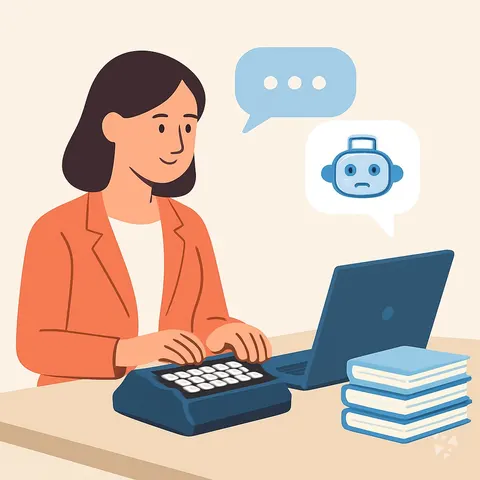





Picked by our course-matching AI for court reporters, your level and your AI, from 700+ courses. Each course ends in a short exam and an AI Expert certificate. New courses arrive every week and your suggestions update with them. Your choices are kept in this browser until you join.
For members: your personal setup prompt, with your sign-in built in. Here's what's inside.
What the setup does
- Connects your AI to your AI Coach: ChatGPT, Claude, Cowork, Microsoft Copilot and more
- Asks you a few questions about your work and saves your profile
- Gives your AI the skills, prompts and tools for court reporters
- Writes your personal instructions and gives you today's first suggestion
What your AI gets: the court reporter AI kit
See everything in your court reporter AI kit: log in or sign up first → · Start for Free
Like "Summarize Long Legal Proceedings"
A new idea from your AI Coach every day
Let your AI hide names, IDs and bank details in documents, translate between eight languages, and fix Czech spelling.
From 4,600+ connections, after a short interview about the apps you use
Have a confirmed qualified interpreter or accommodation for every hearing that needs one.
From 3,900+ AI agents: hand a whole task to AI
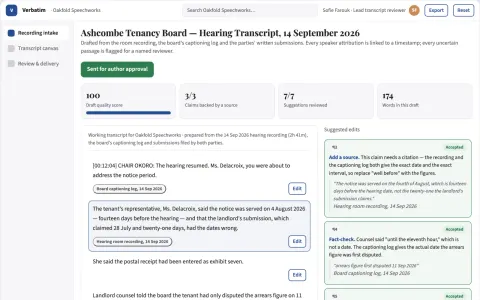
Go from hearing audio to a filed legal note with source attribution and a reviewer record.
From 2,400+ apps you can build, with step-by-step prompts
Not connected? The same suggestions wait for you on your dashboard under Today, with prompts to copy into any AI.
All the courses, certifications, AI tools, connections and apps for court reporters, most relevant first. Tap the heart on anything to save it for later.
All prompt courses for court reporters
How to talk to AI, then 8 lessons with ready-to-use prompts for court reporters.
All video courses for court reporters
94 video courses our AI picked for court reporters, most useful first. Tap the heart to save one for later.
Favorites are saved to your account: sign in or get your AI kit first.
All certifications for court reporters
Every course ends in a short exam and an AI Expert certificate you can add to LinkedIn. Tap the heart to save the ones you're aiming for.
Favorites are saved to your account: sign in or get your AI kit first.
More certifications for court reportersAll AI tools for court reporters
1 AI tools our AI matched to the work of court reporters, best fit first. Each review shows what it does, its alternatives and the jobs it suits.
Favorites are saved to your account: sign in or get your AI kit first.
All connections for court reporters
Connections let ChatGPT, Claude or Copilot look things up and get work done in other apps, like your email, calendar or bookkeeping software. These 7 fit the work of court reporters best, well-known apps first.

Google Drive MCP server
by A1-x-TechLet your AI search, organize, upload, download, export and share your Google Drive files for you.
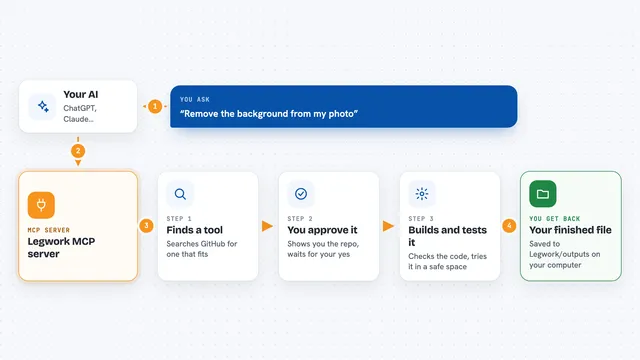
Legwork MCP server
by kumarganduriYour AI can find a tool on GitHub and install it safely, so it can do new jobs on your own files.

Anonymize MCP server
by Buggy1111Let your AI hide names, IDs and bank details in documents, translate between eight languages, and fix Czech spelling.

nab MCP server
by MikkoParkkolaFetch any web page as clean text your AI can read, and turn audio or video files into transcripts.

Botverse MCP server
by MkTurner74Convert videos and documents, and transcribe audio, straight from your AI chat.

Convertica MCP server
by convertica-netConvert, merge, split, compress, sign and protect PDFs and other files right from your AI chat.

dowse MCP server
by ltspaceLets your AI search your Windows files by name, document text, and text inside screenshots.
All apps you can build for court reporters
Apps you build yourself with your own AI, no coding needed and no monthly fee. Our AI picked the one that fits the work of court reporters.







































































About this learning path
6 topicsAI for Court Reporters: A Practical Learning Path
As a court reporter, your days are filled with precise work: capturing every word, formatting transcripts, and meeting tight deadlines. AI can help you do this faster and with less stress, without sacrificing accuracy.
This learning path is designed for working court reporters who want to use AI tools like ChatGPT, Claude, or Gemini in their daily work. You'll learn how to set up AI, connect it to your workflow, and use prompts that are specific to the job. The path includes this prompt course, video courses chosen for court reporters, and the certifications that come with them.
Why AI matters for court reporters now
Courts and law firms are moving faster, and the demand for quick, accurate transcripts is higher than ever. AI can help you keep up by handling repetitive tasks like cleaning up rough drafts, checking for errors, and formatting documents.
Using AI well also makes your work more consistent. It can catch things you might miss when you're tired, and it can help you organize long proceedings so you can find key moments quickly.
What the path includes
The path starts with setup questions to get you comfortable with AI tools. Then you'll learn how to connect your AI to your work, build skills for the job inside your AI, and take this prompt course. You'll also get video courses picked for court reporters and the certifications that come with them.
Everything is practical and based on real tasks you do every day, like cleaning up steno output, proofreading, formatting legal documents, and writing to attorneys.
How it saves time
AI can turn a rough speech-to-text draft into a readable transcript in minutes, not hours. It can check names and spellings consistently, draft standard pages, and create summaries so you don't have to reread every page.
You'll also learn to use AI to plan your week, estimate turnaround times, and communicate with clients without back-and-forth emails. The time you save can go back to the parts of the job that need your full attention.
How it protects your career
Accuracy and confidentiality are the heart of court reporting. This path shows you how to use AI safely, including how to handle sensitive information and redactions. You'll learn to check AI output carefully so your transcripts remain trustworthy.
By adding AI skills to your experience, you stay valuable as the profession changes. You become the reporter who can deliver fast, accurate work and use new tools responsibly.
How to start
Begin with the setup questions to choose an AI tool and get it ready. Then work through the prompt course lessons in order, trying each prompt on a real transcript or a practice file. The video courses and certifications will deepen your skills in specific areas.
Take it one step at a time. Even using one prompt a day can make a difference in your workload and your confidence.
Frequently asked questions
Do I need to be technical to use AI as a court reporter?
No. The path is designed for non-technical professionals. You'll learn simple steps to set up and use AI tools without any coding or advanced computer skills.Is it safe to use AI with legal transcripts?
You need to be careful with confidential information. The path teaches you how to use AI responsibly, including when to avoid sharing sensitive details and how to handle redactions. Always follow your court's rules and client agreements.How long does the learning path take?
You can go at your own pace. Most reporters finish the core lessons in a few weeks, spending a little time each day. The video courses and certifications can be taken as needed.Will AI replace court reporters?
AI is a tool to help you, not replace you. Your judgment, attention to detail, and understanding of legal proceedings are essential. AI handles repetitive tasks so you can focus on accuracy and the human parts of the job.
At a glance
What you get
- 3 step setup process
- Relevant courses for your job (700+ available)
- A certificate per course
- AI Coach
- 15-minute AI setup in ChatGPT, Claude, Copilot and more