

Yocoolab MCP server
by YocoolabLets your AI coding assistant read design feedback threads, screenshots and page selections from Yocoolab.
Developer tools Official
AI Library · 4,611 MCP servers
Lets your AI coding assistant read design feedback threads, screenshots and page selections from Yocoolab.

Let your AI check CircleCI builds, read failure logs, and rerun or start pipelines for you.

Lets your AI debug your code step by step using breakpoints and expression checks inside VS Code.

Lets your AI start containers, deploy Docker Compose stacks, and read logs for you.

Ask your AI about your app logs in plain English and get back the exact entries and patterns.

Ask your AI about your Rootly incidents, on-call schedules, alerts, and services without leaving the chat.

Your AI can spin up real throwaway Windows or Linux computers, use them, then reset them to clean.
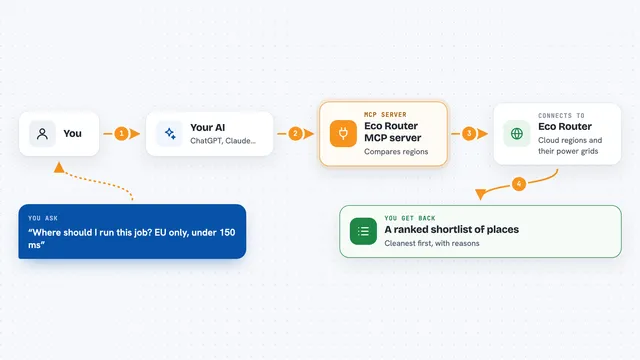
Your AI can pick the lowest-carbon cloud region for a job, ranked by grid carbon and latency.

Run your team's own Python MCP tools on your cloud, with sign-in, guardrails and an audit log.

Lets your AI look up shadcn/ui components, blocks and demos and pull their code into your project.

Lets your AI look up and manage NSX network segments, gateways, NAT rules, routes and IP pools for you.

Ask your AI which library to use and get a scored, compared answer from GitHub instead of a guess.

Let your AI build and test an iPhone or iPad app project and read the errors back to you.

Lets your AI look up and manage your ConfigCat feature flags, configs, environments and products for you.

Let your AI create and update your Kubernetes apps through Cyclops, using your templates.

Let your AI run ping, traceroute, DNS, MTR and HTTP tests from locations around the world.

Turn screen recordings into GitHub bug reports, Playwright tests, and step-by-step guides.

Lets your AI look up TwitterAPI.io documentation offline, so you get answers about endpoints, pricing and auth without leaving your chat.

Lets your AI build your iPhone app, run it in the Simulator, take screenshots, and tap or type on the screen.

Check your website deployments and see their status right inside your AI chat.

Lets your AI start Jenkins jobs, check build status, read logs, and fetch build files for you.

Connect your AI to your Linux servers, Docker, Kubernetes, Proxmox, Grafana and Cisco gear so it can check things, explain them, and fix them when you ask.

Lets your AI search and read code on GitHub, npm, and your own computer to answer questions with real evidence.

Lets your AI check if your project idea already exists on GitHub, npm, PyPI and more before it starts writing code.