
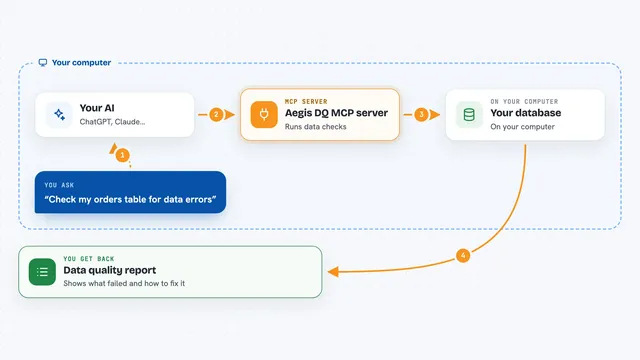
Aegis DQ MCP server
by aegis-dqLets your AI check your data for errors, explain what went wrong, and suggest SQL fixes.
AI Library · 4,609 MCP servers
Lets your AI check your data for errors, explain what went wrong, and suggest SQL fixes.

Lets your AI look up and manage keys, users and clients in Thales CipherTrust Manager for you.

Let your AI search your team's notes and save new ones, with sources and full history.
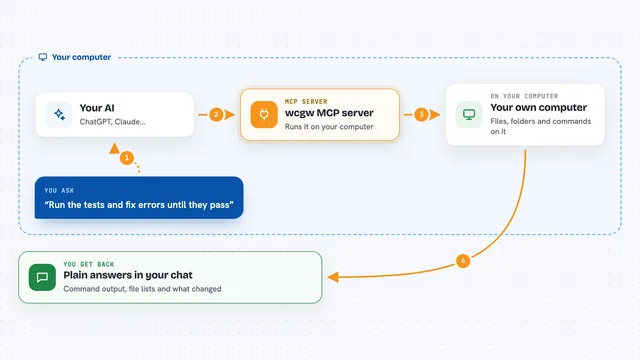
Let your AI run shell commands, read and edit files, and build code right on your own computer.

Let your AI read, write, search and organize files on your computer, even very large ones.

Lets your AI reuse research other developers already did, so it stops re-searching the same things.

Lets your AI build, check and fix Adaptive Cards for Teams, Outlook and Copilot, ready to paste and preview.

Lets your AI look inside your databases, find tables and run queries for you in plain English.

One gate that checks, approves and records every tool call your coding agents make.

Lets your AI look up your team's agreed coding rules and decisions before it writes code.

Give your AI a real terminal and safe file editing powers on your own computer.

Let your AI look at and edit files in folders you choose on your own computer.

Lets your AI look up agent design principles, examples, and guides from the AI Design Blueprint.

Lets your AI check your internet, proxy, and GitHub connection and tell you what to fix.

Lets your AI look inside old MySQL 5.0 to 5.6 databases and run safe read queries for you.
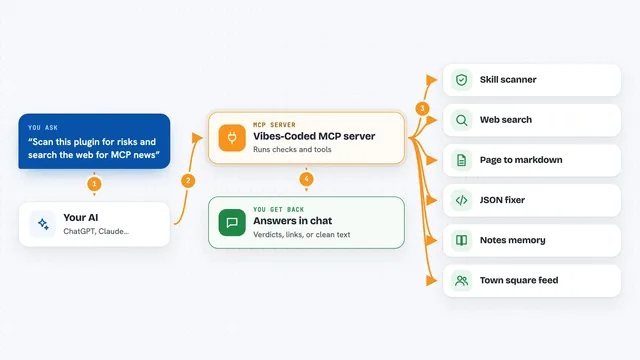
Lets your AI scan agent skills for risks, search the web, and use small paid tools from Vibes-Coded.

Give your AI a lasting memory saved as plain text files in your own git, shared with your team when you want.

Let your AI turn source code into a structured tree so it can read and explain code more accurately.

Lets your AI read, search, and edit files in folders you allow on your own computer.

Lets your AI run pre-approved GraphQL queries against an API you choose, using tools you define in simple files.

Let your AI list, create, clone, start, stop, and delete VMware virtual machines, and check their performance.

Ask your AI about your LLM spend, request logs, traces and anomalies, and get real answers from your Spanlens workspace.

Checks that the tools your AI uses are still the same ones you approved, and blocks the session if they changed.

Give your AI a shared memory so it can save and resume your work across Claude, Cursor and other tools.